Skip to content

@JaredMeredith

Learn. Share. Repeat.

Contact

  • Blog
  • About Me
  • Strengths Finder Top 5
    • Strengths Finder All 34
  • 16Peronalities
  • Builder Profile 10
  • Deploy a Static Web App on Azure with GitHub: Step-by-Step Guide

    11/04/2025

    +

    +

    +

    +

    +

    +

    Enjoy this post of me bringing myself back into some of the basics to better help me keep my solutions architecture reflex fresh (ha)!

    Use Case: I need a static page to host a logout page when users leave the SSO experience to land them to a custom-tailored page where I can provide the right guidance and support language related to the app.

    So, where to begin?

    First, here are some prerequisites to success:

    • Have an active Azure Portal subscription
    • Have a Github account and joined to an organization
    • Download Visual Studio Code
    • (extras) Github Desktop
    • (extras) Git

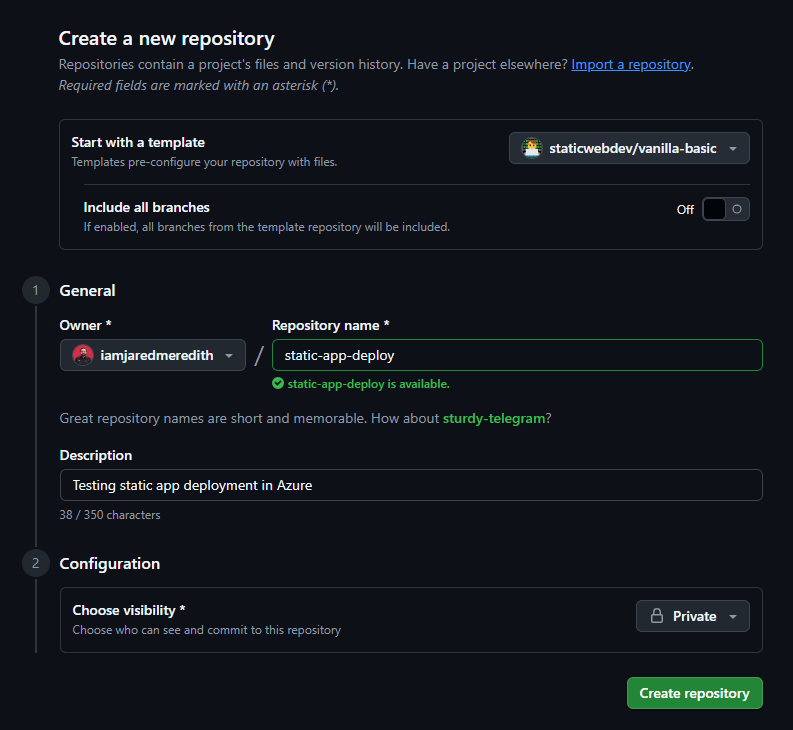
    Next, let’s pull down from a basic starter code kit to save some time on creating it from scratch:

    https://github.com/new?template_name=vanilla-basic&template_owner=staticwebdev

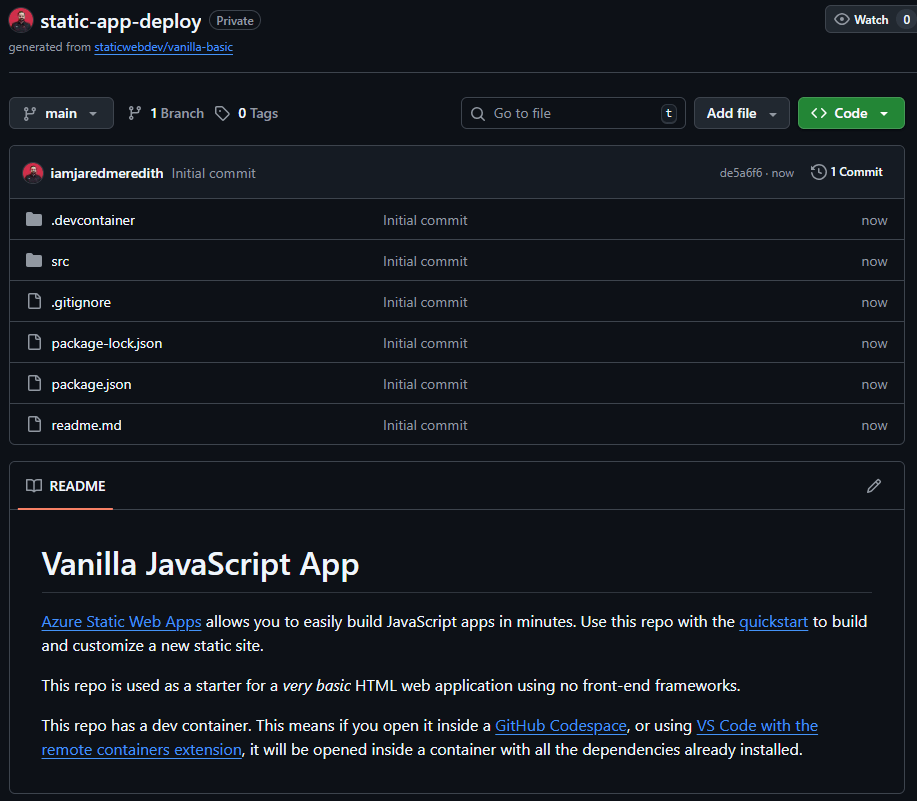
    And boom, just like that a repo with stuff:

    But what to do now? Well so far we now have code, but still need a destination and a means to deploy it.

    For a destination let’s go onward to Azure:

    • Go to the Azure portal and sign-in
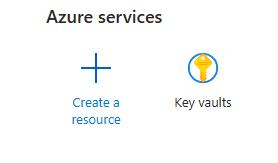
    • Select Create a Resource.
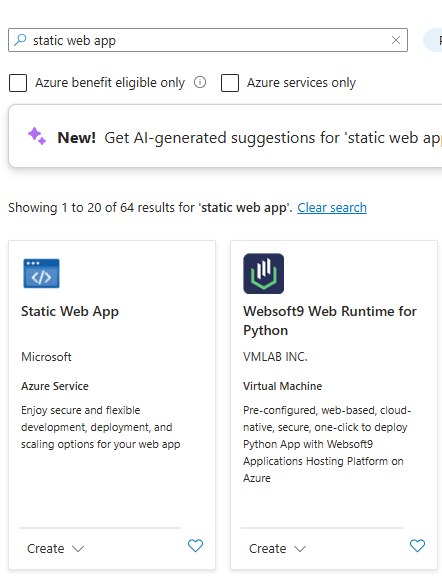
    • Search for Static Web Apps.
    • Select Static Web Apps.
    • Select Create.

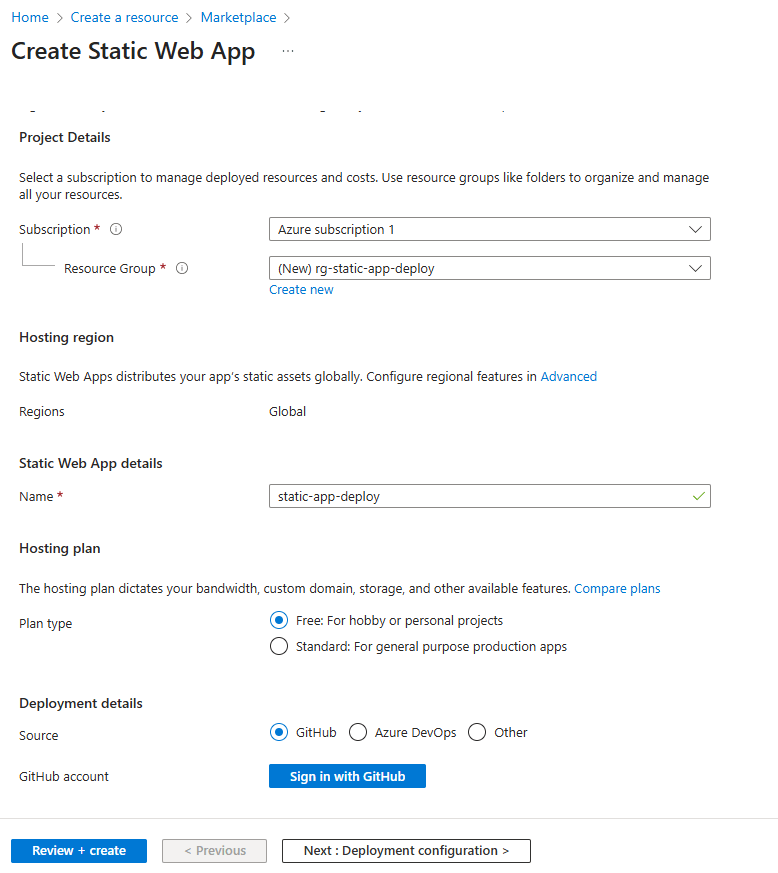
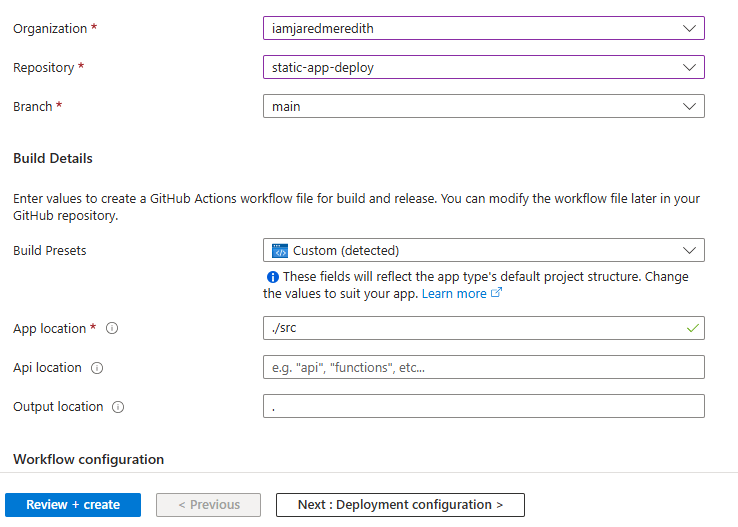
    In the Basics section, begin by configuring your new app and linking it to a GitHub repository.

    SettingValue
    SubscriptionSelect your Azure subscription.
    Resource GroupSelect the Create new link, and enter rg-static-app-deploy in the textbox.
    NameEnter static-app-deploy in the textbox.
    Plan typeSelect Free.
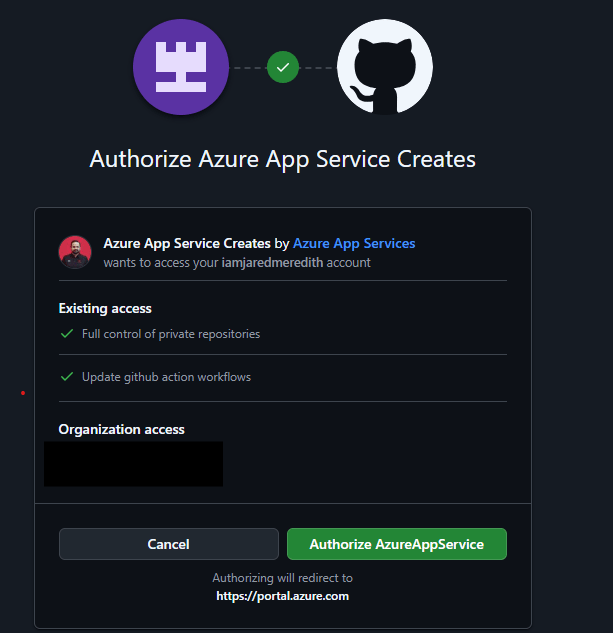
    SourceSelect GitHub and sign in to GitHub if necessary.

    If necessary, sign in with GitHub, and enter the following repository information.

    SettingValue
    OrganizationSelect (your organization).
    RepositorySelect (your repo name).
    BranchSelect (your branch e.g. main).

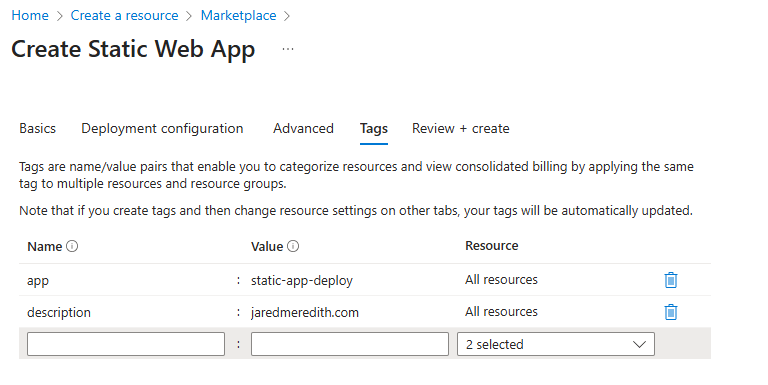
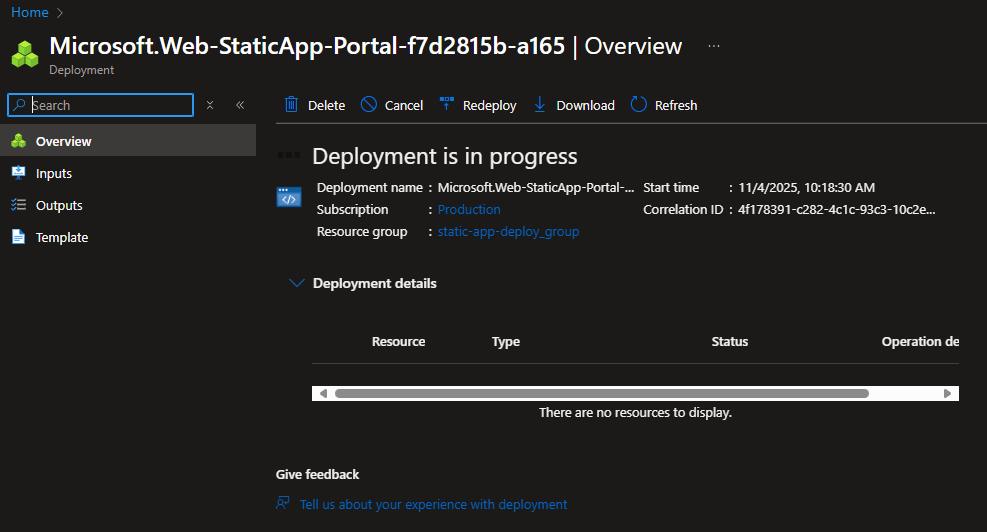
    Once you have completed the wizard then you should see a successful creation of your resource to deploy to. (there are CLI references for those who prefer that below).

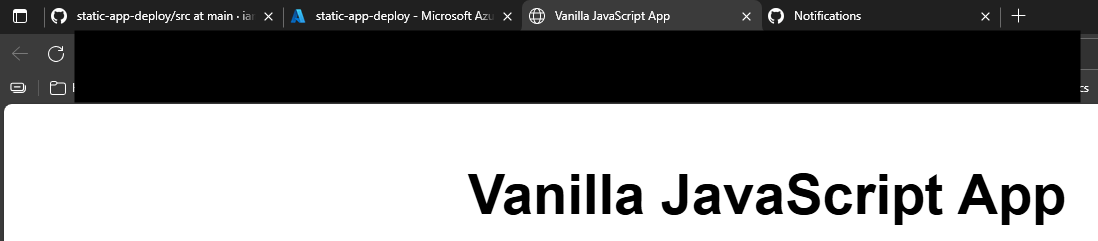
    Your URL from the vanilla template should be live!

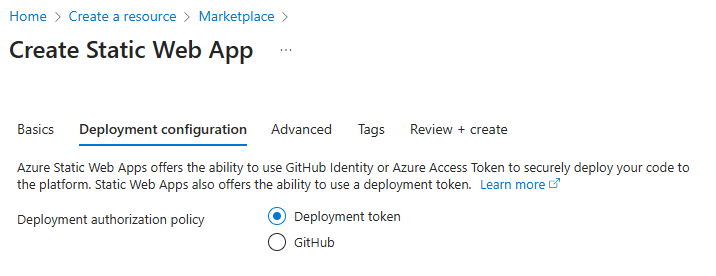
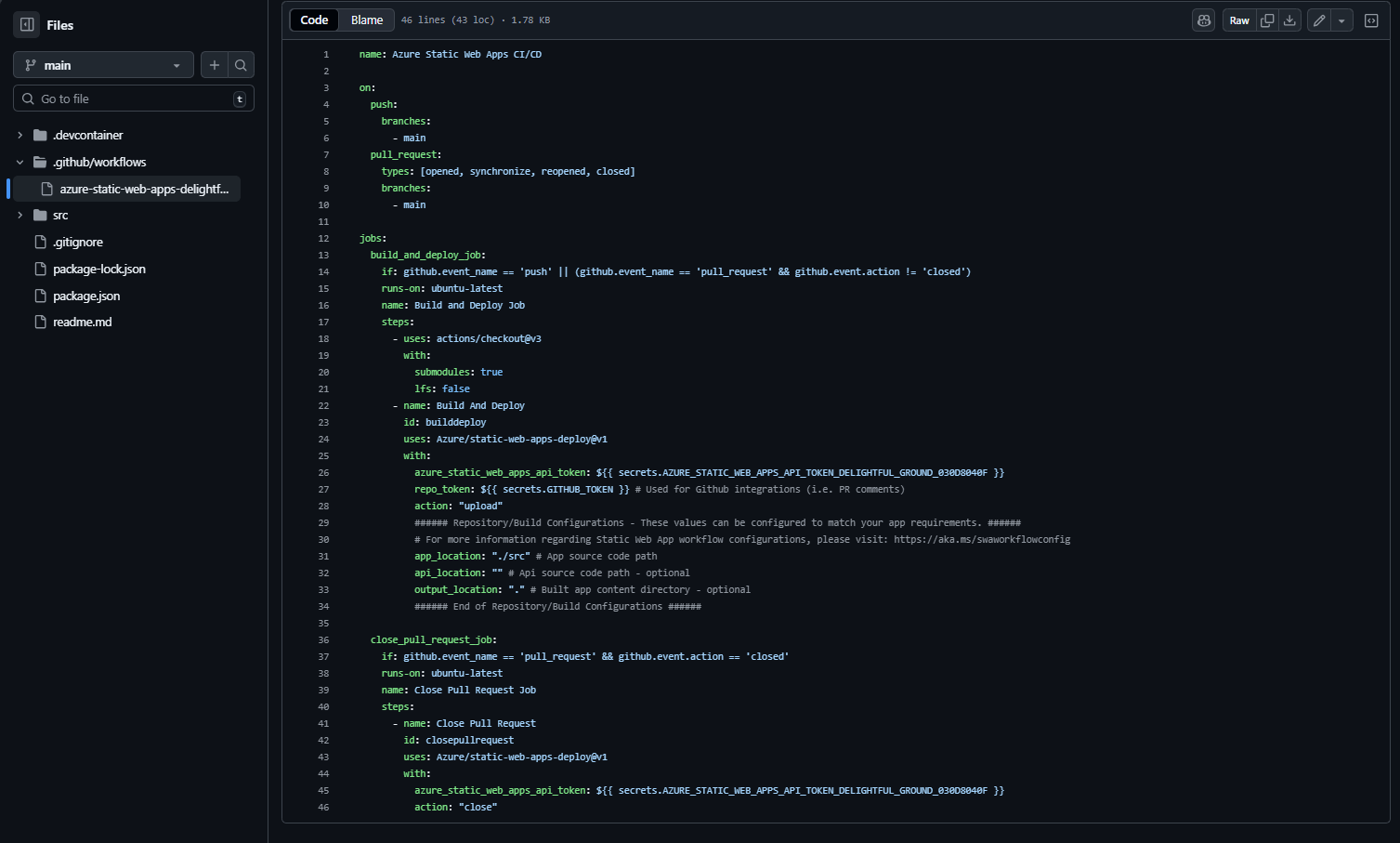
    Within Github you can inspect the yaml that drove the deployment action (depending on what you pick for your token and deployment configuration this will vary):

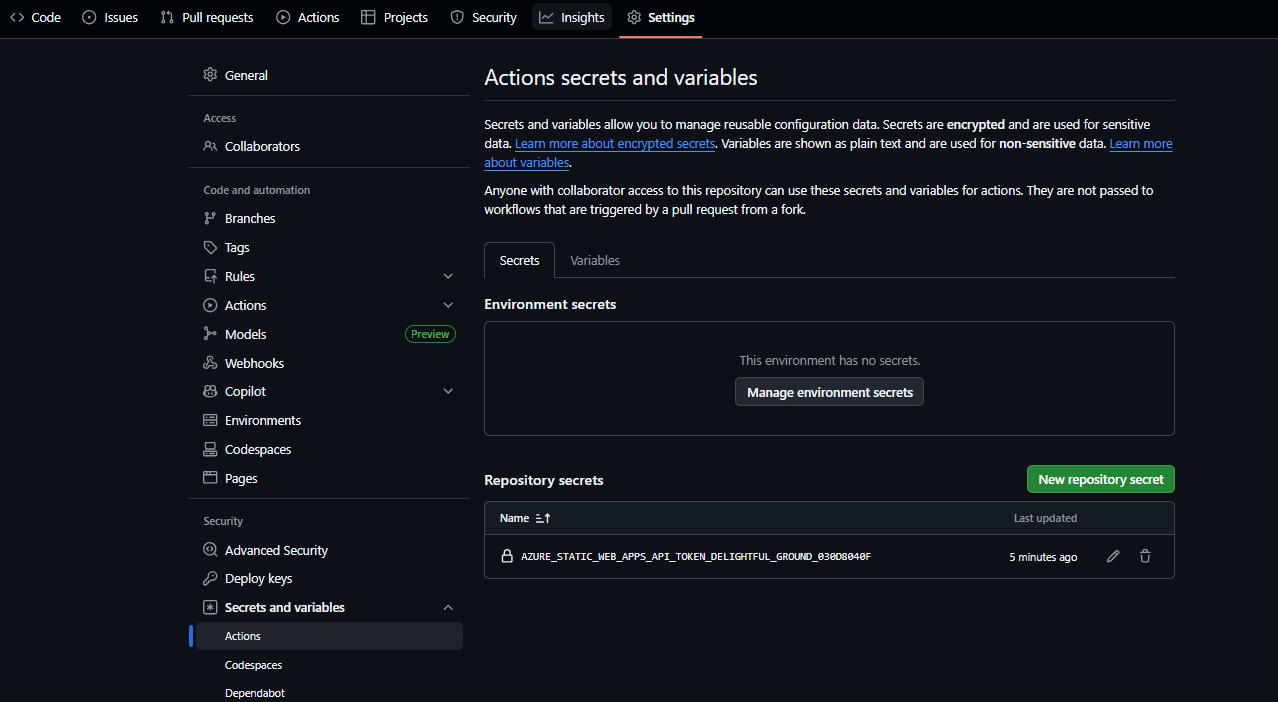
    You can also see where the secret is managed within Settings > Secrets and Variables > Actions:

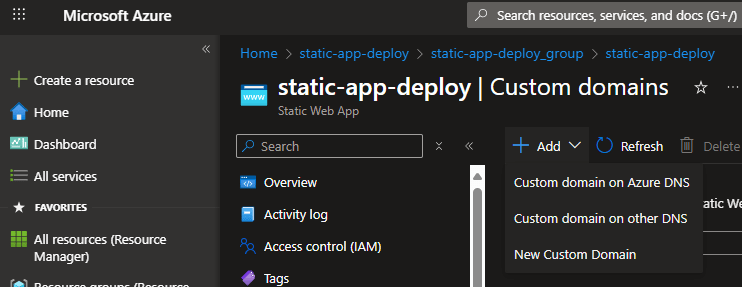
    Some extra credit -> want to add a custom domain to it?

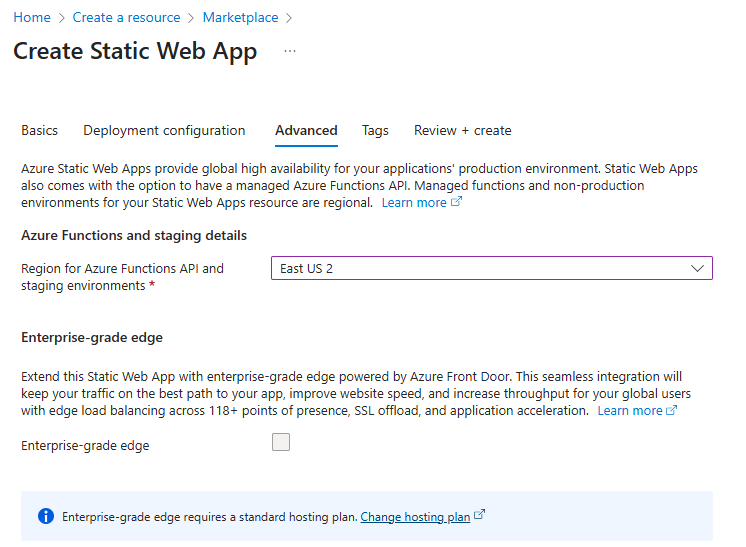
    Additional extra credit -> you can also have the app be front-ended with Azure Front Door.

    Finally, if you’re not going to continue to use this application, you can delete the Azure Static Web Apps instance through the following steps:

    1. Open the Azure portal.
    2. Search for static-app-deploy from the top search bar.
    3. Select the app name.
    4. Select Delete.
    5. Select Yes to confirm the delete action (this action may take a few moments to complete).

    References:

    • https://learn.microsoft.com/en-us/azure/static-web-apps/get-started-portal?tabs=vanilla-javascript&pivots=github
    • https://learn.microsoft.com/en-us/azure/static-web-apps/static-web-apps-cli-deploy
    • https://learn.microsoft.com/en-us/azure/static-web-apps/build-configuration?tabs=identity&pivots=github-actions
    • https://learn.microsoft.com/en-us/answers/questions/4371521/static-web-app-custom-domain-ssl-certificate
    • https://learn.microsoft.com/en-us/azure/static-web-apps/custom-domain
    • https://learn.microsoft.com/en-us/azure/frontdoor/front-door-custom-domain-https?tabs=powershell
    • https://learn.microsoft.com/en-us/azure/static-web-apps/deploy-web-framework?tabs=bash&pivots=vanilla-js

    Help me out and share!

    • Email a link to a friend (Opens in new window) Email
    • Print (Opens in new window) Print
    • Share on LinkedIn (Opens in new window) LinkedIn
    • Share on Facebook (Opens in new window) Facebook
    • Share on X (Opens in new window) X
    • Share on Reddit (Opens in new window) Reddit
    • Share on Tumblr (Opens in new window) Tumblr
    • More
    • Share on Pinterest (Opens in new window) Pinterest
    • Share on Telegram (Opens in new window) Telegram
    • Share on WhatsApp (Opens in new window) WhatsApp

    Like this:

    Like Loading…

    +

    +

    +

    +

    +

    +

    + azure, HTML, Web
    + ai, azure, cloud, github, Microsoft, static web app, technology

    +

    +

    +

    +

    +

    +

    +

    +

    +

    +

    +

    +

  • Optimizing Enterprise Architecture Initiatives: Partnering Model and Essential Stages

    08/11/2024

    +

    +

    +

    +

    +

    +

    In the ever-evolving landscape of enterprise architecture, the journey from discovery to implementation is a complex yet rewarding process. Through this process there are critical phases of this journey, with every portion focused in how you partner with your teams. Join me as we navigate through these essential stages, offering insights and best practices to ensure your enterprise architecture initiatives thrive.

    The Discovery Phase is crucial for understanding the key people involved, their goals, and the challenges ahead. This phase involves identifying strategic priorities to support business outcomes and envisioning the ideal future state without limitations. It also includes planning timelines, understanding deliverables, and ensuring that teams are well-coordinated. By addressing these aspects, we can proactively evaluate and review our progress, tailoring our vision to meet reality while supporting ongoing needs.

    During the Initial Architecture Reviews, the focus shifts to designing and presenting the architecture. This involves documenting the current state, defining technical requirements for the future state, and accounting for any third-party dependencies. The design must comply with architectural standards and be pre-aligned with build teams. Once the design is ready, it is presented to the architecture review board and stored for long-term use. The iterative review process includes listening to feedback, learning from ongoing changes, and improving processes to accelerate compliant development. This ensures that documentation and education are effectively conveyed to support teams and stakeholders.

    Last but not least, the Iterative Architecture Reviews emphasizes continuous improvement and adaptation. It involves regularly assessing how well the processes are working and identifying areas for enhancement. By staying informed about ongoing movements and changes, teams can plan ahead and allocate time for understanding new upcoming work. This phase also focuses on conveying documentation and education effectively, ensuring that everyone involved is well-informed and capable of contributing to the enterprise architecture’s success.

    Let’s now take a deeper dive in how the partnering model comes together with each of these phases:

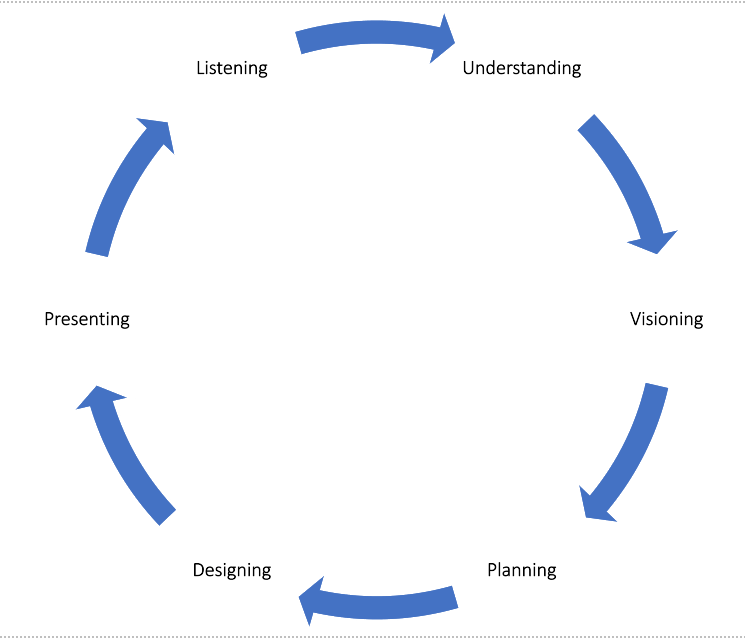
    Enterprise Architecture Partnering Model

    As seen above the partnering model doesn’t end once an architecture is drawn; if anything it only continues to iterate over time. To show this better, here’s a full breakdown of each phase of the partnering model with key questions that should be understood at each part:

    Understanding (Part of Discovery)​

    • Who are the key people to work with? ​
    • What are their goals? their team goals? ​
    • What are the challenges ahead? ​
    • What do we not know yet that will help us understand? ​
    • How can we help support the ongoing needs? ​

    Visioning (Part of Discovery)​

    • What are the strategic priorities to support business outcomes? ​
    • What is the north star? What is the ideal future state with no limitations? ​
    • How are we aiming towards the dream state over 1 year? 3 years? 5 years? ​
    • What can we do to be proactive in evaluation and review? ​
    • How can we tailor the dream to meet reality? ​

    Planning (Part of Discovery)​

    • Do we have a timeline and understanding of the deliverables? ​
    • When and how are the teams meeting? ​
    • How can we get plugged into the ongoing conversations? ​
    • Have we planned enough time to evaluate and design the architecture? ​
    • Who is involved to help manage the gates through the project lifecycle? ​

    Designing (Part of Initial Architecture Reviews)​

    • Do we have an understood and documented current state? ​
    • Do we have technical requirements to support the future state? ​
    • Are there 3rd party external dependencies to account for? ​
    • Does the design accommodate to architectural design standards?​
    • Have the designs be pre-aligned with build teams prior to architecture review? ​

    Presenting (Part of Initial Architecture Reviews)​

    • Does the diagram comply with architectural design standards? ​
    • Has the diagram been presented to architecture review board? ​
    • Has the diagram been stored for long-term use with support teams? ​
    • Has the status of the review been communicated to the project/program teams? ​
    • Have we validated the design with any 3rd party external support? ​

    Listening (Part of Iterative Architecture Reviews and Discovery)​

    • How are we doing? What can be shared about what could be better? ​
    • Where can we learn of ongoing movement or changes? ​
    • How can we improve any processes or standards to accelerate compliant development? ​
    • How can we plan ahead to make time for building understanding of new upcoming work? ​
    • How are we conveying documentation and education to others that they may learn more about EA? ​

    As you work to develop your EA partnerships I know that you’ll see these themes as you go along. I hope this has been helpful, happy architecting!

    Help me out and share!

    • Email a link to a friend (Opens in new window) Email
    • Print (Opens in new window) Print
    • Share on LinkedIn (Opens in new window) LinkedIn
    • Share on Facebook (Opens in new window) Facebook
    • Share on X (Opens in new window) X
    • Share on Reddit (Opens in new window) Reddit
    • Share on Tumblr (Opens in new window) Tumblr
    • More
    • Share on Pinterest (Opens in new window) Pinterest
    • Share on Telegram (Opens in new window) Telegram
    • Share on WhatsApp (Opens in new window) WhatsApp

    Like this:

    Like Loading…

    +

    +

    +

    +

    +

    +

    + EA
    + architecture, business, EA, enterprise architecture, leadership, partnerships, technology

    +

    +

    +

    +

    +

    +

    +

    +

    +

    +

    +

    +

  • Remember the 5-9, not just the 9-5!

    11/17/2023

    +

    +

    +

    +

    +

    +

    Me: (Joins a conference call)

    Someone on call: “Hey, how are you?”

    Me: “Good”

    Also Me: (pondering if I just lied or not)

    What did “Good” mean for that day?

    Let’s review the last 24hr:

    12:05 – 12:30 AM – kid diaper change, make a bottle, feed, rock, back in bed

    12:30 – 4 AM – sleep

    4:05 – 4:30 AM – kid diaper change, make a bottle, feed, rock, back in bed

    4:30 – 7 AM – sleep

    7:05 – 7:30 AM – kid diaper change, make a bottle, feed, playtime, handoff to help

    7:30-7:50 AM – shower and change

    7:50 – 8:30 AM – morning commute, catching up with friends and family

    8:30 – 9 AM – meeting

    9 – 10 AM – meeting

    10 – 11 AM – meeting

    11 – 11:30 AM – snack & break, catch up with kiddo

    11:30 – 12 PM – meeting

    12 – 12:30 PM – meeting

    12:30 – 1 PM – break, catch up on emails and chats that haven’t been hit yet

    1 – 2 PM – meeting

    2 – 3 PM – meeting + (call during the meeting to check in on kiddo and plans for the evening)

    3 – 4 PM – meeting (commuting home)

    4 – 4:30 PM – meeting

    4:30 – 5 PM – kid diaper change, make a bottle, feed, play, back in bed

    5 – 6 PM – dinner, discussing tomorrow’s plans

    6:30 – 7:30ish PM – diaper change, bath time, make a bottle, feed, play, back in bed

    7:30ish – 10 PM – finish last touches on work, spend time decompressing

    10 PM – 12 AM – trying to fall asleep 

    After I thought about it, I probably could have said “tired” and ranted about it…but I also know folks are just trying to be nice.

    All that to say, please be mindful of people’s 5-9. You never know what kind of schedule is happening outside 9-5.

    Next time you ask someone how they are, remember that “Good” might have a lot more behind it.

    Also remember that stress may be on people, even in their replies or tone. We must do our best to lead with empathy and understanding as much as we can accommodate. The more we do, the more I feel like people will return it in kind.

    That’s all for now, carry on.

    #worklifebalance #5to9 #mindfulness #newparent

    Help me out and share!

    • Email a link to a friend (Opens in new window) Email
    • Print (Opens in new window) Print
    • Share on LinkedIn (Opens in new window) LinkedIn
    • Share on Facebook (Opens in new window) Facebook
    • Share on X (Opens in new window) X
    • Share on Reddit (Opens in new window) Reddit
    • Share on Tumblr (Opens in new window) Tumblr
    • More
    • Share on Pinterest (Opens in new window) Pinterest
    • Share on Telegram (Opens in new window) Telegram
    • Share on WhatsApp (Opens in new window) WhatsApp

    Like this:

    Like Loading…

    +

    +

    +

    +

    +

    +

    + Web

    +

    +

    +

    +

    +

    +

    +

    +

    +

    +

    +

    +

  • Presentation Now Available: The Power of Cross-Platform Automated Web-Based Testing in CICD Pipelines

    10/30/2020

    +

    +

    +

    +

    +

    +

    Thanks again TESTINGMIND for the chance to speak and present – great job to the other presenters as well, learned a lot.

    My presentation is now available here

    #qaautomation #qa #qatesting #testingmind

    View the session information from #TAS20 here: https://www.linkedin.com/posts/testingmind-consulting-pvt%2E-ltd%2E_last-week-we-completed-a-rally-of-software-activity-6722944641982971904-dxSD

    Help me out and share!

    • Email a link to a friend (Opens in new window) Email
    • Print (Opens in new window) Print
    • Share on LinkedIn (Opens in new window) LinkedIn
    • Share on Facebook (Opens in new window) Facebook
    • Share on X (Opens in new window) X
    • Share on Reddit (Opens in new window) Reddit
    • Share on Tumblr (Opens in new window) Tumblr
    • More
    • Share on Pinterest (Opens in new window) Pinterest
    • Share on Telegram (Opens in new window) Telegram
    • Share on WhatsApp (Opens in new window) WhatsApp

    Like this:

    Like Loading…

    +

    +

    +

    +

    +

    +

    + Web

    +

    +

    +

    +

    +

    +

    +

    +

    +

    +

    +

    +

  • TLDR: Reflection + Pain = Progress

    07/11/2020

    +

    +

    +

    +

    +

    +

    Reflection:

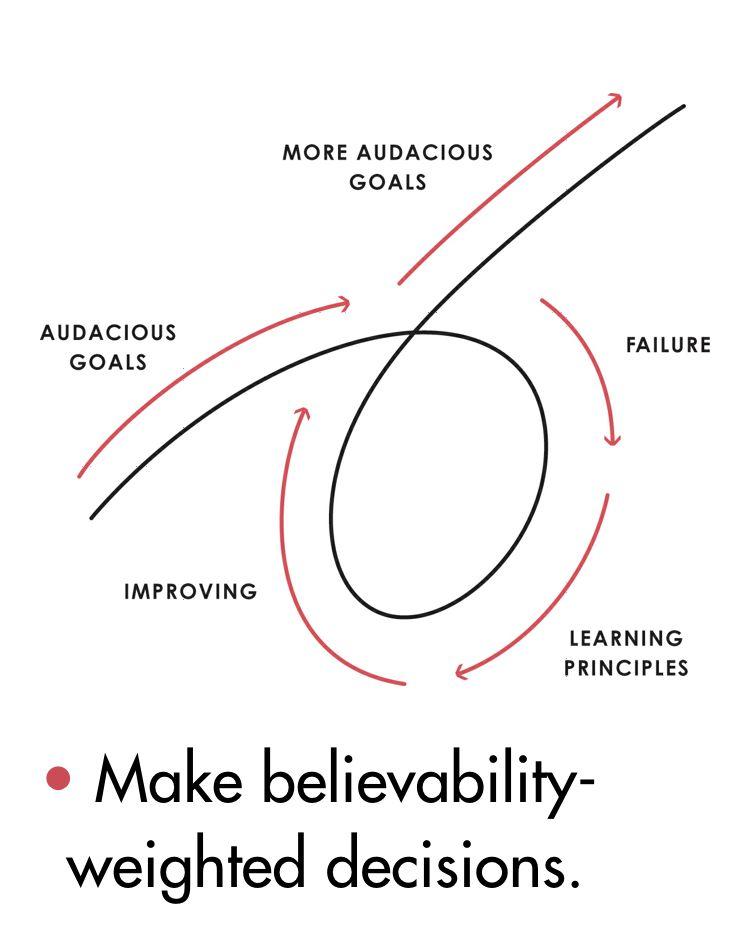
    Been presenting ideas lately and having some tough conversations as of late and feeling pretty defeated from it…BUT I am however reminded that the improvement does not come without a certain degree of failure.

    Pain:

    Without a healthy cycle of debate to review your goals and decisions it is tough to see if your plans and ideas can stand against criticism or not. It may very well turn your plans upside down.

    Progress:

    As you gain clarity and discuss with your colleagues and partners, things begin to improve in the vision and strategy to execute.

    So, if from time to time you also feel defeated from conversations, be reminded of this equation and its impact in your every day.

    #learning #goals #growth #principles #raydalio

    Help me out and share!

    • Email a link to a friend (Opens in new window) Email
    • Print (Opens in new window) Print
    • Share on LinkedIn (Opens in new window) LinkedIn
    • Share on Facebook (Opens in new window) Facebook
    • Share on X (Opens in new window) X
    • Share on Reddit (Opens in new window) Reddit
    • Share on Tumblr (Opens in new window) Tumblr
    • More
    • Share on Pinterest (Opens in new window) Pinterest
    • Share on Telegram (Opens in new window) Telegram
    • Share on WhatsApp (Opens in new window) WhatsApp

    Like this:

    Like Loading…

    +

    +

    +

    +

    +

    +

    + Blog
    + goals, growth, learning, principles, raydalio

    +

    +

    +

    +

    +

    +

    +

    +

    +

    +

    +

    +

  • Join me for “Healthcare Technology During COVID-19” by KTech

    04/20/2020

    +

    +

    +

    +

    +

    +

    Excited to participate as a panelist with the Knoxville Technology Council – please join us for a timely event focused on the technology response to COVID-19!

    When: Wed, May 6, 2020 – 11:30 AM – 1:30 PM EST

    Register here: https://www.eventbrite.com/e/healthcare-technology-during-covid-19-tickets-102690038670?utm-medium=discovery&utm-campaign=social&utm-content=attendeeshare&aff=escb&utm-source=cp&utm-term=listing

    About: Healthcare IT Virtual Learning and Networking Event

    Hear directly from healthcare technology leaders at TeamHealth, Covenant Health, and EDP Biotech about how local companies and organizations are stepping up in big ways to scale, pivot, and innovate in service to the public during the pandemic.

    Panelists:

    – Eric Mayer, EDP Biotech

    – Jared Meredith, TeamHealth

    – John Jeffries, University of Tennessee Medical Center

    – Mike Ward, Covenant Health

    Agenda:

    11:30 AM – Login & Networking

    11:45 AM – Welcome

    12:00 PM – Healthcare IT Panelists Presentations

    12:15 PM – Audience Q&A

    1:00 PM – Additional Networking

    1:30 PM – Event Wrap-up

    #covid19 #workfromhome #teamhealth #knoxtech

    Help me out and share!

    • Email a link to a friend (Opens in new window) Email
    • Print (Opens in new window) Print
    • Share on LinkedIn (Opens in new window) LinkedIn
    • Share on Facebook (Opens in new window) Facebook
    • Share on X (Opens in new window) X
    • Share on Reddit (Opens in new window) Reddit
    • Share on Tumblr (Opens in new window) Tumblr
    • More
    • Share on Pinterest (Opens in new window) Pinterest
    • Share on Telegram (Opens in new window) Telegram
    • Share on WhatsApp (Opens in new window) WhatsApp

    Like this:

    Like Loading…

    +

    +

    +

    +

    +

    +

    + News
    + covid-19, healthcare technology, knox tech council, ktech

    +

    +

    +

    +

    +

    +

    +

    +

    +

    +

    +

    +

  • Going to Codestock? Come see me!

    02/22/2020

    +

    +

    +

    +

    +

    +

    We are happy that TeamHealth is supporting IT with sponsorship at CodeStock Corporation at Codestock 2020! If you are attending, please stop by the booth – we’ll have giveaways and would love to get connected!

    I will have the pleasure of speaking with Amanda Kiser (M.S.) and Jeff Gebhart on two awesome topics:

    “Applying Microservice Thinking To Application Integration”

    (BALLROOM C Fri 12:45 PM — 60 min)

    “The Propensities of Data Driven Culture; Advancing Architecture through The Data Maturity Model”

    (301E Fri 1:55 PM — 60 min)

    For more information and tickets please visit: https://www.codestock.org/

    Join us! #codestock #codestock2020 #teamhealth #findyourFIT

    Help me out and share!

    • Email a link to a friend (Opens in new window) Email
    • Print (Opens in new window) Print
    • Share on LinkedIn (Opens in new window) LinkedIn
    • Share on Facebook (Opens in new window) Facebook
    • Share on X (Opens in new window) X
    • Share on Reddit (Opens in new window) Reddit
    • Share on Tumblr (Opens in new window) Tumblr
    • More
    • Share on Pinterest (Opens in new window) Pinterest
    • Share on Telegram (Opens in new window) Telegram
    • Share on WhatsApp (Opens in new window) WhatsApp

    Like this:

    Like Loading…

    +

    +

    +

    +

    +

    +

    + Blog, News

    +

    +

    +

    +

    +

    +

    +

    +

    +

    +

    +

    +

  • How I Consolidated 25 Websites onto One WordPress Platform and Cut Hosting Costs 80%

    02/12/2020

    +

    +

    +

    +

    +

    +

    When you are a responsible party concerning your companies’ websites, many challenges come up along the way. And one of the toughest challenges I have faced in my career supporting enterprise architecture was working with business partners to make an enterprise decision over an easy one.

    The Problem: Over the course of weeks, my discovery revealed 25 separate websites across 5 different content management systems (CMS), hosted in 10 different servers and locations. Websites in the same CMS platforms were on different versions of the same CMS as well as infrastructure patching schedules. There was no form of source control nor any consistent configuration around the administration services. These complexities not only led to continual issues that had to be managed daily but in turn tied up development resources from focusing on other work. The conclusion was clear that over time the management of the web CMS systems and IT resources would continue to bloat cost and time to delivery on new projects.

    What seems like the right idea: As these problems continue to come up, I recall this being presented in ideas and exploration, “Let’s just put more people on all of these to get them updated. The issue with the easy decision, however, is that the one-time fixes only prolong the root problems. You may have very sharp employees that are more than capable of knocking out these odds and ends jobs, but as any other updates begin to repeat themselves, the cycle repeats itself once more.

    The Enterprise Solution: After all research had been done, the answer was clear: consolidating websites down into the same CMS would reduce the ongoing people support issues while improving the time to delivery on projects. The CMS itself needed to be a platform that allowed for scalability and ease of configuration. Finally, automation was going to be key in how it would assist in accomplishing operations and tasks that reduced unneeded internal labor.

    The Results? 80% overall savings: After a 2 1/2-year transformation, 25 external websites were consolidated into WordPress via WP Engine. WP Engine was our manage services platform of choice, providing enterprise capabilities for all sites with a single pane of glass CMS management experience. Comparing against the 3-year cost-to-date prior spend of 1.5 million dollars we were able to move all sites and cover hosting in a single platform and cover it all 20% the cost. We not only realized cost savings to give dollars saved back to the business but was able to reallocate 2.5 FTEs worth of employees’ time onto other transformative efforts.

    In addition, not only did we improve our hosting and patching automations, but we also enabled development pipelines from source control to have a controlled deployment strategy that went across multiple environments. This empowered a level of Quality Assurance testing and site monitoring we had yet to achieve.

    Customer feedback: Our website editors and stakeholders were beyond thrilled to have only one editing experience to learn and use day to day. Our support teams were also happy, and our overall calls and reported issues were reduced!

    Enterprise principles that supported my decision:

    • Consolidating competing CMS technologies allows for the management of a single platform
    • Leveraging a managed services platform allows a hands-off approach from development resources with ongoing maintenance; maintenance becomes core to the platform and is more easily managed
    • Developing your code within a source control platform allows for version management and prepares you to start considering your deployment strategies

    Enterprise ROI savings can be realized by:

    • Retiring dedicated or hosting infrastructure
    • Reducing editor licenses in separate CMS systems
    • Removing extra 3rd party dependencies specific to an unneeded system
    • Removing unneeded external resources and/or support services costs to assist with troubleshooting
    • Leveraging your existing resources to be focused on new development and no longer in maintain mode

    Regardless of your end decision on a specific product set to support your development team skillsets, one of the keys to drive repeatable enterprise development is to align decisions around simplifying management and driving automation of patching and version upgrades. CMS companies that thrive in licensing will nickel and dime you to bits on progress that you’ll never achieve with always fighting against yourself within their own products. If you’re not able to click less than 5-7 clicks to deliver a fully automated blank site to use, then reconsider your options. Make it a goal to center your platform decisions around their ability to leverage automation in how you can reduce unneeded activities. Automation will empower your staff to focus on new development.

    Help me out and share!

    • Email a link to a friend (Opens in new window) Email
    • Print (Opens in new window) Print
    • Share on LinkedIn (Opens in new window) LinkedIn
    • Share on Facebook (Opens in new window) Facebook
    • Share on X (Opens in new window) X
    • Share on Reddit (Opens in new window) Reddit
    • Share on Tumblr (Opens in new window) Tumblr
    • More
    • Share on Pinterest (Opens in new window) Pinterest
    • Share on Telegram (Opens in new window) Telegram
    • Share on WhatsApp (Opens in new window) WhatsApp

    Like this:

    Like Loading…

    +

    +

    +

    +

    +

    +

    + Blog, CMS, Web, Wordpress
    + architecture, CMS, consolidation, content management system, ROI, savings, website, Wordpress, wp engine

    +

    +

    +

    +

    +

    +

    +

    +

    +

    +

    +

    +

  • SOLVED: Contact form 7 Submission Won’t Send, Stuck on Spinning Wheel

    11/14/2019

    +

    +

    +

    +

    +

    +

    In a recent update on WordPress CMS and my existing plugins I noticed that form submissions started slowing a bit on entries. In checking this I found that the form would attempt to submit but would stay in a spinning stage and never validate or submit it.

    So, here’s what I did to update for a fix.

    1) Head to the plugin editor, update the link below:

    [sourcecode]https://yourwebsite.com/wp-admin/plugin-editor.php?plugin=contact-form-7%2Fwp-contact-form-7.php&Submit=Select[/sourcecode]

    2) Look for the section:

    [sourcecode]
    if ( ! defined( 'WPCF7_LOAD_JS' ) ) {
    	define( 'WPCF7_LOAD_JS', true );
    }
    [/sourcecode]

    3) Update this to:

    [sourcecode]
    if ( ! defined( 'WPCF7_LOAD_JS' ) ) {
    	define( 'WPCF7_LOAD_JS', false );
    }
    [/sourcecode]

    4) Clear cache and try your form again. a good way to see if the spinning wheel issue goes away is if your required fields respond.

    Caveats:

    • The form will no longer send with ajax since you have disabled the javascript.
    • If you update the plugin in any way and have the problem again you will need to reapply this change.

    You can keep up with the ongoing reference to this issue on Contact Form 7’s website.

    10/30/20 Update – Should you want to get out of having to update the plugin directly, you can set a constant in your wp-config.php file to set it and forget it. Link below! 

    Controlling behavior by setting constants

    Help me out and share!

    • Email a link to a friend (Opens in new window) Email
    • Print (Opens in new window) Print
    • Share on LinkedIn (Opens in new window) LinkedIn
    • Share on Facebook (Opens in new window) Facebook
    • Share on X (Opens in new window) X
    • Share on Reddit (Opens in new window) Reddit
    • Share on Tumblr (Opens in new window) Tumblr
    • More
    • Share on Pinterest (Opens in new window) Pinterest
    • Share on Telegram (Opens in new window) Telegram
    • Share on WhatsApp (Opens in new window) WhatsApp

    Like this:

    Like Loading…

    +

    +

    +

    +

    +

    +

    + HTML, JavaScript, Troubleshooting, Web, Wordpress
    + ajax, contact form 7, contact forms, issue, spnning, wheel

    +

    +

    +

    +

    +

    +

    +

    +

    +

    +

    +

    +

  • Need A Quick CSS Override On Just One Page Via JavaScript?

    08/29/2019

    +

    +

    +

    +

    +

    +

    Found this to work really well for a WordPress custom theme where the only option I had was to drop an override via a header/footer plugin option:

    [sourcecode]
    <script>
    var ref= window.location.pathname;
    var search="/youruniquepagelink/";
    if (ref.indexOf(search) > -1) {
    let myElements = document.querySelectorAll(".your-class");
    for (let i = 0; i < myElements.length; i++) {
    myElements[i].style.display = "none";
    }
    }
    </script>
    [/sourcecode]

    Help me out and share!

    • Email a link to a friend (Opens in new window) Email
    • Print (Opens in new window) Print
    • Share on LinkedIn (Opens in new window) LinkedIn
    • Share on Facebook (Opens in new window) Facebook
    • Share on X (Opens in new window) X
    • Share on Reddit (Opens in new window) Reddit
    • Share on Tumblr (Opens in new window) Tumblr
    • More
    • Share on Pinterest (Opens in new window) Pinterest
    • Share on Telegram (Opens in new window) Telegram
    • Share on WhatsApp (Opens in new window) WhatsApp

    Like this:

    Like Loading…

    +

    +

    +

    +

    +

    +

    + Throwback Archive
    + CSS, JavaScript, override, Wordpress

    +

    +

    +

    +

    +

    +

    +

    +

    +

    +

    +

    +

  • Project Management in a Rapidly Evolving IT Landscape

    07/13/2019

    +

    +

    +

    +

    +

    +

    With companies evolving their platforms and services every day we know that technology is constantly changing. New efforts are constantly bubbling up to transform old processes and operations must continue to work smoothly. And if you are lucky enough to be in a place where an implemented solution is doing well, chances are it is time to start looking for the end of life or next release coming around the corner!

    I can readily admit that at times I feel rushed and challenged to find the right time to insert myself into a project, and I am seemingly always trying to regroup, get organized, and hit the ground running (or slamming on the brakes in red flag situations).  Regardless of the stage at which you find your projects, be aware of insights and strategies you need to employ to establish the appropriate roles in fast and competitive environments.

    How do we keep up?

    If you are in a fast-moving environment you will need to be able to assess and understand quickly just how good or not so good a specific project is going.

    Here are some potential problems you can use to assess how far a project has come:

    • Initial high-level strategy conversations for potential transformational work without an Executive and Project Sponsor
    • Working of business relationships / partnerships without a Solution Delivery Leader and Product Owner
    • Kicking off schedules and coordinating resource & task plans without a Project Manager
    • Business requirements and process steps not reviewed or optimized from a Business Analyst
    • Attempting to drive towards integrations without defined data flows from a Data Analyst
    • Initial architectural designs or defined solution capabilities without guidance or approval from an Architect
    • Development and configuration activities for a solution without an Engineer

    Based on which activity that has not occurred helps you to identify when a project is off. If one or more of these are true then it would be time to pause and to begin to seek the right people to understand what really needs to happen next.

    (The Unicorn Exception -> if you are in a situation in which you are performing multiple roles you are a unicorn for a standard project! Personally I love unicorns (I feel like one myself) but I know often it will stress out standard IT structures. What I would tell you is that even though you can wear multiple hats it does not mean you can abandon either the quality of work or the time to invest in each role.)

    Tips for hitting the ground running in IT projects:

    First, please work with the proper people to clarify and to understand the importance of your role in a project. Without the education and the understanding to help people temper their desire to push forward without the right help, people will not realize the cost of rework or of having to acquire an additional solution down the road.

    Next, understand the current progress of a project. In order to understand how much rework or backing up may be required, you first need to get a good perspective on where the project is.

    Finally, understand your role and the deliverables you need to provide. It is important to know what you need to do and when you need to do it so you can plan within the project schedule for a successful delivery. Above all, allowing enough time for the task is crucial so that teams know what to expect from a reasonable schedule.

    Tips on questions you can ask to hone in on current status:

    – Has the project been approved? (money available to spend?)

    – Has the working team been identified (Solution Delivery Manager, Product Owner, Project Manager, Business Analyst, Data Analyst, Architect & Engineers)?

    – Have requirements been established?

    – Has the process been understood and optimized (leaned) out?

    – Are there completed artefacts for a defined target architecture or potential proposed solution?

    Chances are once you get this understanding you will know approximately where a project is in the current process and where you need to contribute appropriately. Do not wait for someone to approach you first for help; be proactive instead of reactive!

    Know what to do? Let’s get to work: Once you understand the current state of a project, don’t hesitate to insert yourself into the resource plan and project timeline. Allow ample time to ensure your role is not lost due to something being rushed or dependent on a date. Chances are your business partners will be flexible to shift your dates if you have done a good job at establishing the importance of your role and its prominent place in the project timeline.

    Finally, perform the work and deliver your artefacts and recommendations specific to your role. If this is accomplished, it either will validate that the proposed solution accommodates the process and requirements with provided capabilities or that the parts completed thus far need another round of rework. Either way, these are both very positive outcomes compared to the alternative:  just marching on and hoping for the best— with mixed results.

    Done? Time to Retro: Once you’ve completed a certain milestone it is very important to educate your departments and teams about what should be done differently in the future. Without this education and course correction, you may find yourself suffering the same issues over and over again. Learn and grow from the retro!

    Update (10/15/2019) -> This write-up is now featured in CIO Applications!

    Link: https://www.cioapplications.com/cxoinsights/project-management-in-a-rapidly-evolving-it-landscape-nid-5160.html 

    Help me out and share!

    • Email a link to a friend (Opens in new window) Email
    • Print (Opens in new window) Print
    • Share on LinkedIn (Opens in new window) LinkedIn
    • Share on Facebook (Opens in new window) Facebook
    • Share on X (Opens in new window) X
    • Share on Reddit (Opens in new window) Reddit
    • Share on Tumblr (Opens in new window) Tumblr
    • More
    • Share on Pinterest (Opens in new window) Pinterest
    • Share on Telegram (Opens in new window) Telegram
    • Share on WhatsApp (Opens in new window) WhatsApp

    Like this:

    Like Loading…

    +

    +

    +

    +

    +

    +

    + Blog
    + how to, IT, perspective, project, retro, role, tips

    +

    +

    +

    +

    +

    +

    +

    +

    +

    +

    +

    +

  • Looking Back! ETSU Computer Science Edition

    06/10/2019

    +

    +

    +

    +

    +

    +

    Background for this post: I was recently working through some summer cleanup in the garage and unearthed what I had discovered as my binder box. As I began to take one last pass through these papers before a final recycling place it gave me pause to reflect and to share to those who have seen things change over time.

    It seems like it is now so long ago that had just found the passion in computer science and began my journey during my tenure at ETSU. Looking back on it now I can definitely say I am thankful for all of the highs and lows I experienced: showing excellence in some areas, showing vulnerabilities in others and growing to learn, and above all the experience to collaborate and begin to understand what would eventually come daily teamwork. I can also way with great certainty that I am THRILLED in how far we have came in automation since my graduating class was sent forth: half of our work could have been in a run book, and our virtuals could have been speedy in the cloud! 🙂

    Though a lot of the concepts may be refreshed or different my overall discipline to consume and learn new things has still held to this day. I definitely want to thank all of my instructors, collegiate colleagues and alum that helped me to push through to the end! I am most definitely better for it and will never forget all my memories (and sometimes late night studies) that brought me to where I am today.

    Enjoy the collage! #memories

    2019-06-08 16.43.09
    2019-06-08 16.40.02
    2019-06-08 16.42.58
    2019-06-08 16.48.08
    2019-06-08 16.50.01
    2019-06-08 16.49.36
    2019-06-08 16.46.31
    2019-06-08 16.43.49
    2019-06-08 16.46.08
    2019-06-08 16.46.50
    2019-06-08 16.37.33
    2019-06-08 16.36.43
    2019-06-08 16.45.05
    2019-06-08 16.41.40
    2019-06-08 16.40.39
    2019-06-08 16.39.52
    2019-06-08 16.40.59
    2019-06-08 16.49.21
    2019-06-08 16.48.19
    2019-06-08 16.44.24
    2019-06-08 16.40.09

    and of course, farewell to my days of binders and handwritten pages that became my foundation for the corporate universe! #ETSU #GoBucs #Binders

    2019-06-08 16.36.50
    2019-06-08 16.35.53

    I think the only thing that was harmful in this experience was to unearth how time has flown by and that my age is definitely a few versions past the original release! 🙂

    Help me out and share!

    • Email a link to a friend (Opens in new window) Email
    • Print (Opens in new window) Print
    • Share on LinkedIn (Opens in new window) LinkedIn
    • Share on Facebook (Opens in new window) Facebook
    • Share on X (Opens in new window) X
    • Share on Reddit (Opens in new window) Reddit
    • Share on Tumblr (Opens in new window) Tumblr
    • More
    • Share on Pinterest (Opens in new window) Pinterest
    • Share on Telegram (Opens in new window) Telegram
    • Share on WhatsApp (Opens in new window) WhatsApp

    Like this:

    Like Loading…

    +

    +

    +

    +

    +

    +

    + Blog
    + Blog, college, computer science, education, etsu, memories

    +

    +

    +

    +

    +

    +

    +

    +

    +

    +

    +

    +

  • 10 Guiding Principles of Mentoring: Lessons from Mentoring Interns and Teams

    04/20/2019

    +

    +

    +

    +

    +

    +

    I have enjoyed mentoring in many companies and types of settings. Whether interns at the workplace, up and coming members at my place of worship or with people 3rd party charitable ministries there have been many great learning opportunities that I have been blessed to learn and grow from as a person. Mentoring is the lifeblood of continuing to provide the most powerful means of training and developing relationships. If you have the time in your company or organization to provide this and make a difference than please do!

    My Top 10 Guiding Principles of Mentoring

    1) Mentoring is equally just as important to the mentor as it is to the mentee – realize that you are not only providing a chance of growth to the individual but to yourself also. We can always learn and grow from the new personalities and perspectives that we have a chance to be a part of.

    2) Mentoring is not telling people what to do; it’s how to guide people to learn how to do it. If people are never equipped with the knowledge and confidence to execute in the problem in front of them then they may be less apt to take those bigger steps in their future. Build their confidence!

    3) Mentoring takes time (and it’s time well spent). If you’re not willing to invest an ongoing slot of time to people you are mentoring then both parties suffer in the process. And I can say from experience that you will know the right amount of time to invest in someone when they’re less focused on asking questions and instead feeling confident in execution.

    4) Mentoring is to give others the edge you did not have when you started. If we do not raise the bar in where we start our prospective candidates then we in turn are not shifting our talent to be more like the quality candidates we want to hire.

    5) Mentoring tests your ability to lead and manage others. Chances are if working with new people and helping them learn new things presents a challenge to tough then you may want to keep focused as an individual contributor and continue enriching your ability to lead and influence.

    6) People receiving mentoring should be receiving from you a combination of selflessness, teaching, communication and learning. Any piece of this that is left off will result in teaching without applicability, only doing your things you selfishly do not wish to do, communicating only when obligated to and learning without understanding the purpose.

    7) Effective mentoring is not driven by being their “boss”; it is driven by your actions in being their guide. Often times I have seen internships or new candidates turn into cheap labor having only a few purposes of things we do not want to do. These experiences that candidates have are not well received and do hinder the overall company or organization reputation.

    8) Mentoring will coach your candidate through their fears and insecurities. Candidates should walk away from your mentoring feeling more confident in prior areas of weakness.

    9) Mentoring is an open door, an open ear and an open mind. If you close any of these you will not promote the development of conversation and ideas. Sometimes a new fresh perspective from someone outside of the norm can be the jump-start you need to be excited about mentoring.

    10) Mentoring promotes the development of mentors. Over many occasions I have now seen before my eyes candidates I have worked with now mentoring others and developing new employees and candidates.

    PDF: Click Here To Download

    Help me out and share!

    • Email a link to a friend (Opens in new window) Email
    • Print (Opens in new window) Print
    • Share on LinkedIn (Opens in new window) LinkedIn
    • Share on Facebook (Opens in new window) Facebook
    • Share on X (Opens in new window) X
    • Share on Reddit (Opens in new window) Reddit
    • Share on Tumblr (Opens in new window) Tumblr
    • More
    • Share on Pinterest (Opens in new window) Pinterest
    • Share on Telegram (Opens in new window) Telegram
    • Share on WhatsApp (Opens in new window) WhatsApp

    Like this:

    Like Loading…

    +

    +

    +

    +

    +

    +

    + Blog
    + coach, guiding principles, help, intern, internship, manage, mentoring, mentorship, teach, time

    +

    +

    +

    +

    +

    +

    +

    +

    +

    +

    +

    +

  • Solved: odata filter by datetime with greater than (or less than) range

    03/28/2019

    +

    +

    +

    +

    +

    +

    Need to filter your odata query and only have the datetime value to work with?

    if your format looks like: 2018-12-31T00:00:00

    Then you can query it by wrapping it in a datetime tag with quotes. see example below with it combining with an ID filter to only show a person’s information greater than 1/1/2018

    [sourcecode]
    https://yourserver/yourservice/YourData?$filter=(%20ID%20eq%201234%20and%20EXP_DATE%20gt%20datetime%272018-01-01T00:00:00.000%27)
    [/sourcecode]

    Note: you can also do other options like less than (lt) or others.

    Onward!

    Help me out and share!

    • Email a link to a friend (Opens in new window) Email
    • Print (Opens in new window) Print
    • Share on LinkedIn (Opens in new window) LinkedIn
    • Share on Facebook (Opens in new window) Facebook
    • Share on X (Opens in new window) X
    • Share on Reddit (Opens in new window) Reddit
    • Share on Tumblr (Opens in new window) Tumblr
    • More
    • Share on Pinterest (Opens in new window) Pinterest
    • Share on Telegram (Opens in new window) Telegram
    • Share on WhatsApp (Opens in new window) WhatsApp

    Like this:

    Like Loading…

    +

    +

    +

    +

    +

    +

    + API, Programming
    + API, datetime, filter, odata, Query

    +

    +

    +

    +

    +

    +

    +

    +

    +

    +

    +

    +

  • SOLVED: Redirect a SharePoint page using a meta tag to a new URL

    01/29/2019

    +

    +

    +

    +

    +

    +

    I have a SharePoint tenant where we are working to redirect some existing pages over to landing pages that are providing instructions for migrating. Needed something short and sweet to flip it over without much trouble. It’s easier to manage with a meta rather than fighting the “making your external client side javascript work with SharePoint” fight. This one takes less than 5 minutes.

    So via SharePoint Designer:

    [sourcecode]
    <meta http-equiv="refresh" content="0;url=http://your-url-goes-here" />
    [/sourcecode]

    That’s it. Onto the next one!

    Help me out and share!

    • Email a link to a friend (Opens in new window) Email
    • Print (Opens in new window) Print
    • Share on LinkedIn (Opens in new window) LinkedIn
    • Share on Facebook (Opens in new window) Facebook
    • Share on X (Opens in new window) X
    • Share on Reddit (Opens in new window) Reddit
    • Share on Tumblr (Opens in new window) Tumblr
    • More
    • Share on Pinterest (Opens in new window) Pinterest
    • Share on Telegram (Opens in new window) Telegram
    • Share on WhatsApp (Opens in new window) WhatsApp

    Like this:

    Like Loading…

    +

    +

    +

    +

    +

    +

    + Programming, SharePoint, Web
    + Link, meta, redirect, SharePoint, URL

    +

    +

    +

    +

    +

    +

    +

    +

    +

    +

    +

    +

  • What Is a Laggard? Why Companies Should Invest in the People Who Learn

    09/22/2018

    +

    +

    +

    +

    +

    +

    Have you ever heard of or heard yourself or others be referred to as a Laggard?

    Google defines a laggard as:

    noun – “a person who makes slow progress and falls behind others.”

    adjective – “slower than desired or expected.”
    Do you identify with that? Have you ever referred to anyone like that? First of all, I think that laggard is pretty rough of a term…which is why you also see the reference to the “mainstreamers” as a more friendly word for it.
    I believe when we tend to think of a laggard we think of the classic curve in reference of the Rogers version relative to adoption:
    Regardless of what we call it I have some things to share today in reference to my real-life “laggard” realization in my career and the decision I made in my life to stop being stuck where I was and choosing to further in my career.

    About 10 years ago I graduated from college with a Bachelor’s of Science in IT, focusing in the Information Sciences and Programming backgrounds. During that final year a very wise professor at the time made a statement towards the end of my tenure in school that really shook me then.

    “Whatever you have learned up to this point…three years from now will be completely obsolete.”

    “Whatever you have learned up to this point…three years from now will be completely obsolete.”

    After some confused faces and reactions in the room, the professor continued:

    “However, if you have truly paid attention to the concepts that help you to understand the basics then regardless of the language of the day or technology you build your practices will guide you through.”

    “However, if you have truly paid attention to the concepts that help you to understand the basics then regardless of the language of the day or technology you build your practices will guide you through.”

    At the time, I thought to myself in a moment of confidence, “Wow, that seems a bit forward, I’ll be fine!” Wrong! I have learned through 10 years of experience now that there were no truer words ever spoken to me (about my career) at the time that I heard them.

    In today’s ever-moving technical climate of mobile evolution, social media startups and new technologies making it easier than ever to go to the once mysterious cloud I have found that things are moving much faster than my professor may have even understood.

    Being in a transition period in my career in the past 2 years I have found that I am in a place that I believe a lot of other folks have been in before or may be in the near future. There was a point where I felt like everything I was confident in understanding had become obsolete and that everything that was in front of me for a new future required me to make a choice to want to evolve my learning. On top of that there was the constant reminder of new people coming in and demonstrating in their learning (sometimes in ways that left me feeling very deflated) what I did not understand as great. Not to mention the ever looming call to responsibility to drive positive results with the best of my ability.

    “There was a point where I felt like everything I was confident in understanding had become obsolete and that everything that was in front of me for a new future required me to make a choice to want to evolve my learning.”

    What do I do? Well, I knew at the time of my self-evaluation that most everything I ever was taught in language, system or structures ten years ago was definitely in the latter part of the mainstream part of the adoption curve. It was only a matter of time where if I did nothing else I would have to begin taking a long look at the market to see where else I could thrive with my existing skill set. Maybe there is something close by? Then, as that began to feel scary I began to think about what my options could be to grow. After looking at courses I began to feel discouraged as a lot of the topics out there cost time, money and your presence away from your day to day work (that ensures to make you feel behind).

    After many months of soul searching, being made to feel ignorant in work settings, left out by others and left on the assumption that I wouldn’t know I finally made a decision. I decided then that I would chose to grow and refused to be stuck anymore.

    I would not be bullied by fears of learning or worried of leaving a few tasks behind to make time to grow. Even if I would not be provided moments during the day I chose to grow where I could elsewhere. It was a mindset change, a choice I made, and do not regret it. I would no longer blame my surroundings, commitments or challenges to keep me from making this something I do. I may fail. I may not understand it all. However, I would rather fail fast and grow than to give up! I then recalled being willing to do this before I started my career in college and this encouraged my willingness to want to learn more now.

    Today, I am fighting for my relevance in my career and will encourage all that I can to remember to do the same.

    “I may fail. I may not understand it all. However, I would rather fail fast and grow than to give up!”

    These days I am learning every day. Free resources such as videos and websites out there are the best place to start. Joining social networking groups around topics I am unfamiliar in is another great step. I am voicing my want for more and am investing by making the time for it today. And in just a couple years of time I know for sure I am turning back the meter and heading towards new things! Conferences are great but make time for the learning opportunities and not just the free t-shirts. Training and courses, whether virtual or in-person and a must in today’s evolving tech climate and a must. Whatever you choose to do use these learning moments to fight to stay relevant with your investment into yourself!

    So today as I close this open story of my personal career to those still hungry to work and others curious of the meaning of my intent I leave you with these words: Remember the laggard! 

    Companies, remember that one of the most meaningful means of retention is the means to which you invest in people, especially their ability to evolve their skills and mindset. Laggards are not just people who know old things; laggards are loyal, invested people who simply need the opportunity to grow. Empower people with the freedom to be away in the short-term (for a little while) normal efforts to invest in themselves and you will see growth and trust in the working relationship for building longevity and driving positive results. When we choose short-term results and fail to invest here we begin to see teams that become less apt to adopt new things and challenge themselves, thus leaving key areas of business stuck in the mercy of mainstream and slowly letting our fears slow our progress. Fail fast, take chances on people, and never lose the grip of the importance of investing in continual learning!

    “Companies, remember that one of the most meaningful means of retention is the means to which you invest in people, especially their ability to evolve their skills and mindset.”

    Individuals out there, remember to choose to grow no matter your obstacles and know that you are able to do it. Remember to prioritize it as much as you want it. And just like every good degree, certification or learning experience any knowledge you gain to help you evolve and move forward in your career is worth the investment. Every time. Make sure you always include learning in your career plans and give voice to making sure others that help you succeed know that it is important to you. Do not get stuck in the mainstream and lose your confidence to try new things! And lastly, remember that if you are in a good place in your career and are in the midst of new learning…take others with you. Mentor and help others to not be afraid of embracing growth!

    “Individuals out there, remember to choose to grow no matter your obstacles and know that you are able to do it. Remember to prioritize it as much as you want it. And just like every good degree, certification or learning experience any knowledge you gain to help you evolve and move forward in your career is worth the investment. Every time.”
    Help me out and share!

    • Email a link to a friend (Opens in new window) Email
    • Print (Opens in new window) Print
    • Share on LinkedIn (Opens in new window) LinkedIn
    • Share on Facebook (Opens in new window) Facebook
    • Share on X (Opens in new window) X
    • Share on Reddit (Opens in new window) Reddit
    • Share on Tumblr (Opens in new window) Tumblr
    • More
    • Share on Pinterest (Opens in new window) Pinterest
    • Share on Telegram (Opens in new window) Telegram
    • Share on WhatsApp (Opens in new window) WhatsApp

    Like this:

    Like Loading…

    +

    +

    +

    +

    +

    +

    + Blog
    + Blog, challenges, laggard, learning, training

    +

    +

    +

    +

    +

    +

    +

    +

    +

    +

    +

    +

  • Need to Export More Than 5000 Rows in Google Analytics?

    08/29/2018

    +

    +

    +

    +

    +

    +

    So I tried some googling around to some solutions and found some plugins or URL updates that did not pan out. So…after a little more digging I came across a link that spoke of a free tool that let’s you pull all your rows out of data with no limitations for your GA accounts. Turns out it’s true!

    • Download the software at the following URL: http://www.analyticsedge.com/simply-free/
    • Open Excel, Click the Analytics Edge Tab and accept the terms of use and supply and email for the free license
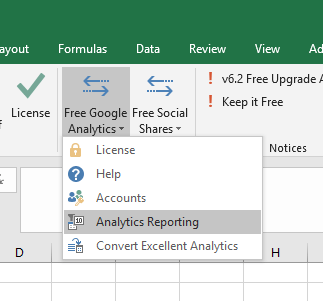
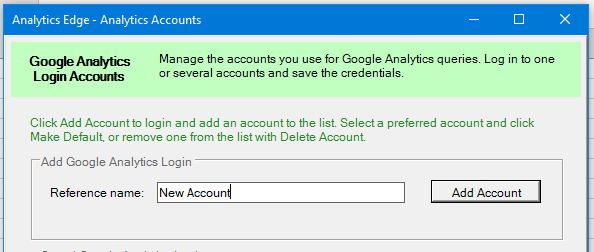
    • You’ll need to first add an account to get started, select “Accounts”

    • Name the account that you want to use going forward (you can have more than 1)

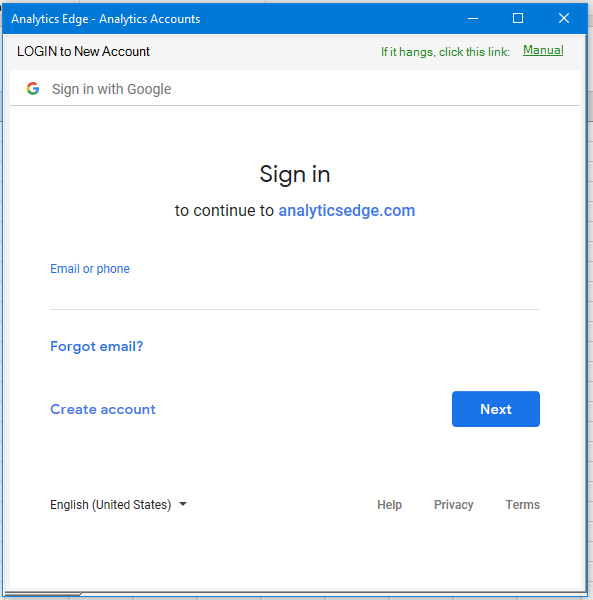
    • Sign in with your google analytics account

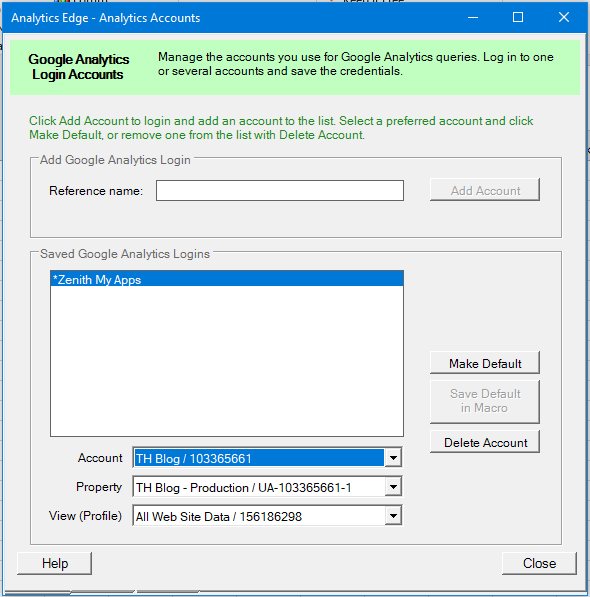
    • Once signed in you’ll see your account information

    • To get started with a report return back to Free Google Analytics >> Analytics Reporting

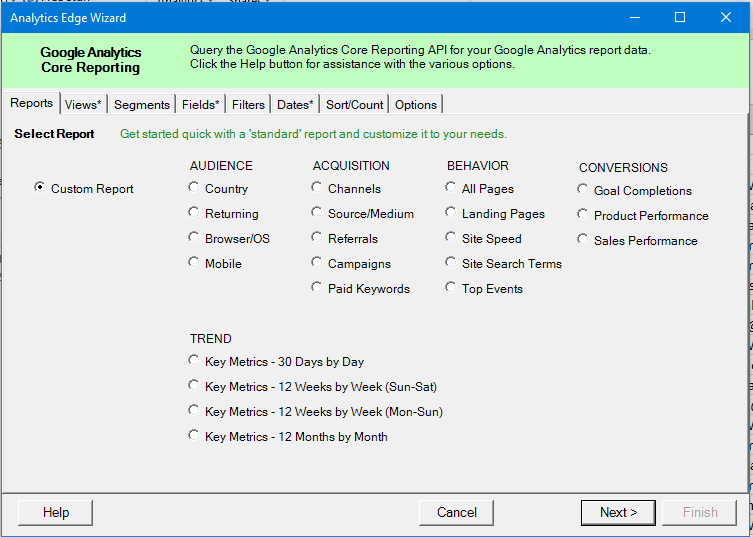
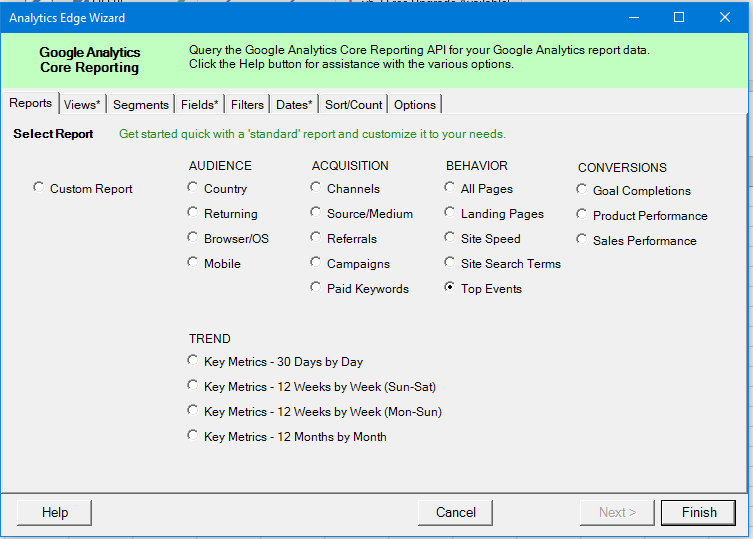
    • The default wizard should load up. We’ll get started on pulling a report now!

    • Select the section of Google Analytics you want to report off of:

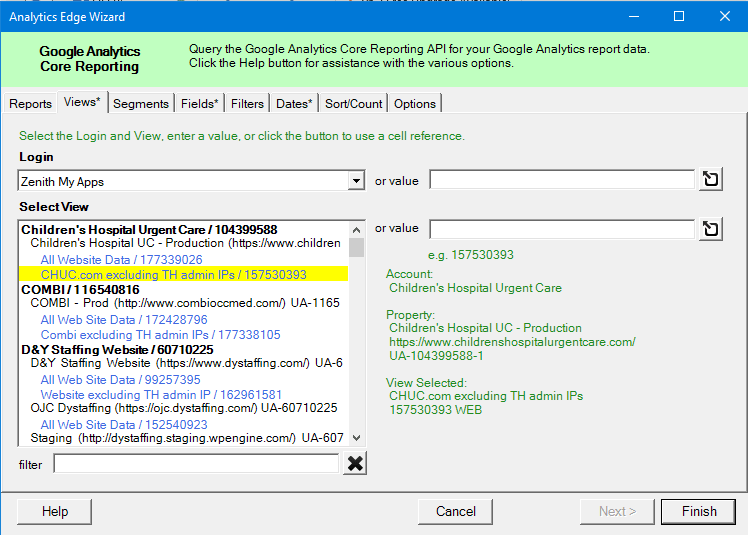
    • Select the view from Google Analytics you wish to pull data from:

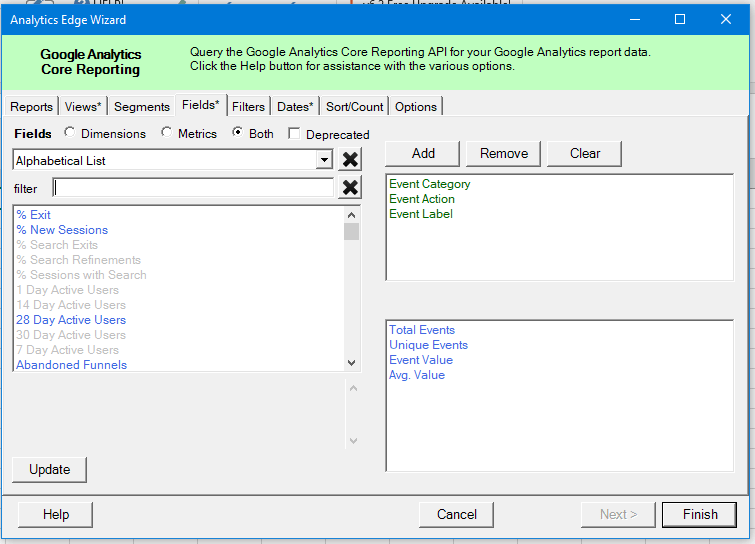
    • Select which fields you want to see in the report:

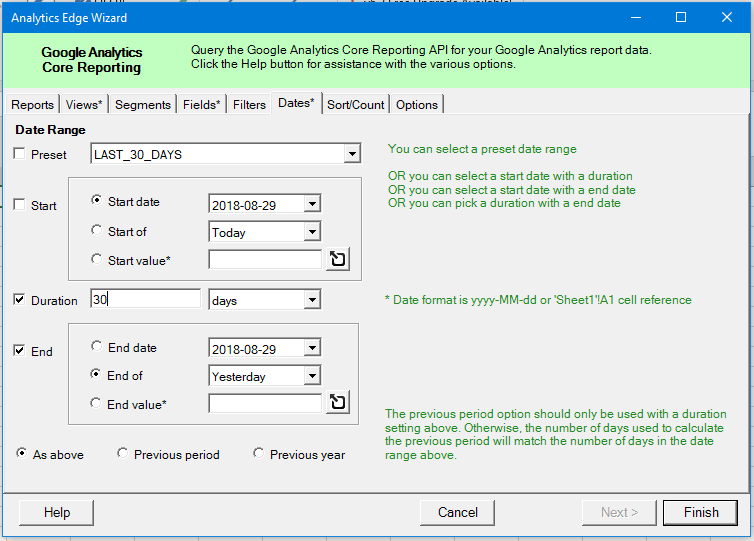
    • Select the date range to which you want to pull data from:

    • Once the report has completed you should see data from your analytics!

    Hope this helps.

    Other helpful links:

    • https://help.analyticsedge.com/function/ga-help/ 
    • https://help.analyticsedge.com/function/aeb-help/?utm_medium=aeBasic&utm_source=installer&utm_campaign=6.2.0.0

    Help me out and share!

    • Email a link to a friend (Opens in new window) Email
    • Print (Opens in new window) Print
    • Share on LinkedIn (Opens in new window) LinkedIn
    • Share on Facebook (Opens in new window) Facebook
    • Share on X (Opens in new window) X
    • Share on Reddit (Opens in new window) Reddit
    • Share on Tumblr (Opens in new window) Tumblr
    • More
    • Share on Pinterest (Opens in new window) Pinterest
    • Share on Telegram (Opens in new window) Telegram
    • Share on WhatsApp (Opens in new window) WhatsApp

    Like this:

    Like Loading…

    +

    +

    +

    +

    +

    +

    + Google Analytics, Troubleshooting
    + Google Analytics, Troubleshooting

    +

    +

    +

    +

    +

    +

    +

    +

    +

    +

    +

    +

  • How To Use the Box API To Adjust User Properties and Make Read-Only in Bulk (w/example)

    04/25/2018

    +

    +

    +

    +

    +

    +

    • Get up to date on the APIs you need for users @ https://developer.box.com/v2.0/reference
    • Sign up for your developer account at your enterprise @ https://yourenterprise.app.box.com/developers/console (replace with your enterprise application name in the link above)
    • Create your Box app & API Key – link here and here
    • Pull down the Box Windows SDK @ – https://github.com/box/box-windows-sdk-v2
    • Update the pem file with your actual pem information from the app you created
      • in case you’re wondering it should contain the —–BEGIN ENCRYPTED PRIVATE KEY—– and —–END ENCRYPTED PRIVATE KEY—–
    • Update the properties appropriately in the app.config

    [sourcecode]
    <appSettings>
    <add key="boxClientId" value="uniquestringhere" />
    <add key="boxClientSecret" value="uniquestringheretoo" />
    <add key="boxEnterpriseId" value="1234567" />
    <add key="boxPrivateKeyPassword" value="uniquestringhereforpassword" />
    <add key="boxPublicKeyId" value="uniquepublickeyid" />
    <add key="ClientSettingsProvider.ServiceUri" value="useifneeded" />
    </appSettings>
    [/sourcecode]

    • From there you can update your Main runner in the program.cs appropriately. In the case of my sample below I am getting authorized, retrieving my users and looping through everyone but the main admin account and making them read-only. I’m also writing the information out to a file so I’ll have the logs of who was set / not set.

    [sourcecode]

    var privateKey = File.ReadAllText("private_key.pem");

    var boxConfig = new BoxConfig(CLIENT_ID, CLIENT_SECRET, ENTERPRISE_ID, privateKey, JWT_PRIVATE_KEY_PASSWORD, JWT_PUBLIC_KEY_ID);
    var boxJWT = new BoxJWTAuth(boxConfig);

    var adminToken = boxJWT.AdminToken();
    Console.WriteLine("Admin Token: " + adminToken);
    Console.WriteLine();

    var adminClient = boxJWT.AdminClient(adminToken);

    var items = await adminClient.UsersManager.GetEnterpriseUsersAsync("", 0, 1000);
    items.Entries.ForEach(async i =>
    {
    if (i.Login != "myspecialadminaccount@domain.com")
    {
    BoxUserRequest userRequest = new BoxUserRequest()
    {
    Id = i.Id,
    Status = "cannot_delete_edit_upload"
    };
    System.Console.WriteLine("\t{0}", i.Name);
    System.Console.WriteLine("\t{0}", i.Id);
    System.Console.WriteLine("\t{0}", i.Login);
    System.Console.WriteLine("\t{0}", i.Type);
    System.Console.WriteLine(" ");
    // Turn on for prod
    BoxUser user = await adminClient.UsersManager.UpdateUserInformationAsync(userRequest);
    Console.WriteLine(userRequest.Name + "updated to read-only");
    System.Threading.Thread.Sleep(2000);
    stringtext = i.Name.ToString() + " – " + i.Id.ToString() + " – " + i.Login.ToString() + " – " + i.Type.ToString() + " – updated to readonly" + Environment.NewLine;
    System.Console.WriteLine(" ");

    }
    else
    {
    BoxUserRequest userRequest = new BoxUserRequest()
    {
    Id = i.Id
    };
    System.Console.WriteLine("\t{0}", i.Name);
    System.Console.WriteLine("\t{0}", i.Id);
    System.Console.WriteLine("\t{0}", i.Login);
    System.Console.WriteLine("\t{0}", i.Type);
    System.Console.WriteLine(" ");
    Console.WriteLine(userRequest.Name + " NOT updated to read-only");
    System.Threading.Thread.Sleep(2000);
    stringtext = i.Name.ToString() + " – " + i.Id.ToString() + " – " + i.Login.ToString() + " – " + i.Type.ToString() + " – NOT updated to readonly" + Environment.NewLine;
    System.Console.WriteLine(" ");

    }
    });
    File.AppendAllText("C:\\Temp\\" + "log.txt", stringtext);
    [/sourcecode]

    • Enable your box application to your enterprise accounts – link here
    • Run your app (In TEST with test accounts! Then, with approval, prod.)
      • If the app won’t run…check:
        • code syntax errors
        • certificate pem
        • values in the app config
        • authorization status in the admin Console on Box
        • that your app is enabled and still available on the enterprise developer site

    Hope this helps! I can send the source out on request if needed (just let me know).

    Help me out and share!

    • Email a link to a friend (Opens in new window) Email
    • Print (Opens in new window) Print
    • Share on LinkedIn (Opens in new window) LinkedIn
    • Share on Facebook (Opens in new window) Facebook
    • Share on X (Opens in new window) X
    • Share on Reddit (Opens in new window) Reddit
    • Share on Tumblr (Opens in new window) Tumblr
    • More
    • Share on Pinterest (Opens in new window) Pinterest
    • Share on Telegram (Opens in new window) Telegram
    • Share on WhatsApp (Opens in new window) WhatsApp

    Like this:

    Like Loading…

    +

    +

    +

    +

    +

    +

    + API, Box, C#, Certificates, Web, XML
    + API, Box, C#, developer, read-only, readonly, users

    +

    +

    +

    +

    +

    +

    +

    +

    +

    +

    +

    +

  • Sitecore Error (SOLVED): An item name cannot contain any of the following characters: \/:?”\-|[] (controlled by the setting InvalidItemNameChars)

    04/04/2018

    +

    +

    +

    +

    +

    +

    You may have ran into an issue during deployments when trying to publish in the past where you have seen this message:

    “An item name cannot contain any of the following characters: \/:?”<>\-|[] (controlled by the setting InvalidItemNameChars)”

    In order to help move forward on this you need to disable the default ItemNameValidation settings if you are having some deployment issues.

    To do that (would only recommend temporarily) you can follow the steps below:

    Add a config file to App_Config/Include named z.DisableItemNameValidation.config and put this in it:

    [sourcecode]
    <configuration xmlns:patch="http://www.sitecore.net/xmlconfig/"&gt;
    <sitecore>
    <settings>
    <setting name="ItemNameValidation">
    <patch:attribute name="value"></patch:attribute>
    </setting>
    </settings>
    </sitecore>
    </configuration>
    [/sourcecode]

    Again, when you are finished I would recommend taking this back out of your files to keep things as standard as possible.

    Help me out and share!

    • Email a link to a friend (Opens in new window) Email
    • Print (Opens in new window) Print
    • Share on LinkedIn (Opens in new window) LinkedIn
    • Share on Facebook (Opens in new window) Facebook
    • Share on X (Opens in new window) X
    • Share on Reddit (Opens in new window) Reddit
    • Share on Tumblr (Opens in new window) Tumblr
    • More
    • Share on Pinterest (Opens in new window) Pinterest
    • Share on Telegram (Opens in new window) Telegram
    • Share on WhatsApp (Opens in new window) WhatsApp

    Like this:

    Like Loading…

    +

    +

    +

    +

    +

    +

    + .Net, HTML, IIS, Sitecore, Visual Studio, Web, XML
    + characters, config, invalid, sitecore, Troubleshooting, xml

    +

    +

    +

    +

    +

    +

    +

    +

    +

    +

    +

    +

  • Action board: What words and actions are driving you?

    01/20/2018

    +

    +

    +

    +

    +

    +

    I find each day has its challenges to give a chance to reveal a new possible action that can be taken to improve the moment.

    As something I am learning each day I find that sometimes it’s good to visualize key actions and values to remember how we focus ourselves and work to apply them every day. You may not apply them all at once but as you come back to it and think through your experiences you can reflect and continue to figure out where you can grow and build your partnerships.

    Challenge yourself, chances are you may find you have a lot more of these than you think. Thanks for reading.

    Any other good ones for the board?

    Help me out and share!

    • Email a link to a friend (Opens in new window) Email
    • Print (Opens in new window) Print
    • Share on LinkedIn (Opens in new window) LinkedIn
    • Share on Facebook (Opens in new window) Facebook
    • Share on X (Opens in new window) X
    • Share on Reddit (Opens in new window) Reddit
    • Share on Tumblr (Opens in new window) Tumblr
    • More
    • Share on Pinterest (Opens in new window) Pinterest
    • Share on Telegram (Opens in new window) Telegram
    • Share on WhatsApp (Opens in new window) WhatsApp

    Like this:

    Like Loading…

    +

    +

    +

    +

    +

    +

    + Blog, Web
    + Blog, growth, inspire, leadership

    +

    +

    +

    +

    +

    +

    +

    +

    +

    +

    +

    +

1 2 3
Next

Linkedin

Tumblr

GitHub

Mastodon

Designed with WordPress.

Loading Comments...
%d