IIS, Programming, VB

Need To Clean Your IIS Log Files (Older Than x Number of Days) For All Sites? Here’s a Script

You may have the classic issue of needing logs cleared but you do not have time to log onto each server and delete files for space. Here’s a script that will do it for all IIS sites and will let you select how many days back you wish to keep. For this example this script is wrote for 30 days and would be run on a task scheduler monthly.

  • Open notepad and create a file called IISLogMonthlyCleanup.vbs
  • Put in the following snippet and adjust your settings to apply to what you need:
sLogFolder = "c:\inetpub\logs\LogFiles"
iMaxAge = 30 ' # of days
Set objFSO = CreateObject("Scripting.FileSystemObject")
set colFolder = objFSO.GetFolder(sLogFolder)
For Each colSubfolder in colFolder.SubFolders
 Set objFolder = objFSO.GetFolder(colSubfolder.Path)
 Set colFiles = objFolder.Files
 For Each objFile in colFiles
 iFileAge = now-objFile.DateCreated
 if iFileAge > (iMaxAge+1) then
 objFSO.deletefile objFile, True
 end if
 Next
Next

Save and run. *Poof* the old logs are gone. Set it up in a task scheduler and move on to more important things.

TIP: You can run the scheduled task as SYSTEM since it has privileges to run whether logged on or not. It also has access to the file system.

Hope this helps.

.Net, IIS, Programming, Web, XML

Using Encryption and Decryption on a .Net Web.Config ConnectionString

If you have .Net web applications that are connecting to data sources that you do not want other users to know about then chances are it is about time to start encrypting the connection strings. Why is this important? If you have an external website that fails (and you do not have any custom error pages) then you may expose connection information in the stack trace or error messages. Also, you do not want to allow other developers that stumble upon your connection string to see your connection information in clear text. Over time and many applications later I went from trying to remember paths and commands and have created batch files to perform this on a minimal web.config.

I am going to walk through how to create some encrypt/decrypt batch files and how these are used in conjunction with your web.config.

  • Ensure you have a .Net Framework installed to use the aspnet_regiis.exe program. For this example we are using .Net Framework 4.0.
  • Create a folder for all of your files to sit inside of. For this demo let’s call the folder “decrypter”. Make note of where you are storing this folder to use in your batch files in the next steps. For this example let’s assume “C:\decrypter”
  • Open notepad and create a file named Decrypt.bat and add the following information (take note of the path you’ll need to update based on where you are going to store your folder):
echo Decrypting connection strings
C:\Windows\Microsoft.NET\Framework64\v4.0.30319\aspnet_regiis.exe -pdf "connectionStrings" "C:\decrypter"
Pause
  • Open notepad again and create a file named Encrypt.bat and add the following information (take note of the path you’ll need to update based on where you are going to store your folder):
echo Encrypting connection strings
C:\Windows\Microsoft.NET\Framework64\v4.0.30319\aspnet_regiis.exe -pef "connectionStrings" "C:\decrypter"
Pause
  • Open notepad again and create a web.config file and insert your connectionstrings section inside (make sure to place this file in the same location as the batch files, you’ll use this over and over):
<?xml version="1.0" encoding="utf-8"?>
<configuration>
<connectionStrings>
 <add name="Demo" connectionString="Data Source=123.45.67.89;Initial Catalog=DemoCatalog;Persist Security Info=True;User ID=specialuser;Password=specialpassword" providerName="System.Data.SqlClient" />
 </connectionStrings>
</configuration>
  • Once you have that saved, run your Encrypt.bat as administrator. You should see the following:

en-example

  • Your connection strings are now encrypted. Review your web.config and see:
<?xml version="1.0" encoding="utf-8"?>
<configuration>
<connectionStrings configProtectionProvider="RsaProtectedConfigurationProvider">
 <EncryptedData Type="http://www.w3.org/2001/04/xmlenc#Element"
 xmlns="http://www.w3.org/2001/04/xmlenc#">
 <EncryptionMethod Algorithm="http://www.w3.org/2001/04/xmlenc#tripledes-cbc" />
 <KeyInfo xmlns="http://www.w3.org/2000/09/xmldsig#">
 <EncryptedKey xmlns="http://www.w3.org/2001/04/xmlenc#">
 <EncryptionMethod Algorithm="http://www.w3.org/2001/04/xmlenc#rsa-1_5" />
 <KeyInfo xmlns="http://www.w3.org/2000/09/xmldsig#">
 <KeyName>Rsa Key</KeyName>
 </KeyInfo>
 <CipherData>
 <CipherValue>You'll Have A Cipher Here.</CipherValue>
 </CipherData>
 </EncryptedKey>
 </KeyInfo>
 <CipherData>
 <CipherValue>You'll Have A Cipher Here.</CipherValue>
 </CipherData>
 </EncryptedData>
</connectionStrings>
</configuration>
  • You can now take the connectionStrings section and replace your cleartext version for your application.
  • Should you ever need to update your connectionStrings simply place the encrypted version back on your minimal web.config and run the Decrypt.bat (as administrator). This is what you should see:

de-example

  • You should then see your original clear text connection string. Hope this helps.
  • Things of note:
    • You can also do this with other sections of the web.config (just rename connectionStrings to whatever section you need to encrypt)
    • If you have comments inside of your connectionString the encryption and decryption will remove them.
    • Another reference: https://msdn.microsoft.com/en-us/library/zhhddkxy.aspx

CRM, IIS, Troubleshooting

Resolving CRM XRMServices System.ServiceModel.ServiceActivationException Issues With Multiple IIS Site Bindings

So if you ever attempt to go from http to https (or vice versa) on your CRM environment be aware that you may face the following issue with your XRM Services if you have multiple bindings set in IIS:

WebHost failed to process a request.
 Sender Information: System.ServiceModel.ServiceHostingEnvironment+HostingManager/12547953
 Exception: System.ServiceModel.ServiceActivationException: The service '/Dev/XRMServices/2011/Organization.svc' cannot be activated due to an exception during compilation. The exception message is: The value could not be added to the collection, as the collection already contains an item of the same type: 'System.ServiceModel.Description.UseRequestHeadersForMetadataAddressBehavior'. This collection only supports one instance of each type.
Parameter name: item. ---> System.ArgumentException: The value could not be added to the collection, as the collection already contains an item of the same type: 'System.ServiceModel.Description.UseRequestHeadersForMetadataAddressBehavior'. This collection only supports one instance of each type.
Parameter name: item
 at System.Collections.Generic.KeyedByTypeCollection`1.InsertItem(Int32 index, TItem item)
 at Microsoft.Crm.Extensibility.SdkServiceEndpointBuilder.AddDefaultPorts(ServiceHost serviceHost, PortSchemeDictionary portSchemes)
 at Microsoft.Crm.Extensibility.SdkServiceEndpointBuilder.AddDefaultEndpoint(ServiceHost serviceHost, Type implementedContract)
 at Microsoft.Crm.Extensibility.SdkServiceEndpointBuilder.BuildEndpoints(ServiceHost serviceHost, Type implementedContract, Func`1 messageInspectorFactory)
 at Microsoft.Crm.Extensibility.SdkServiceHost.InitializeRuntime()
 at System.ServiceModel.ServiceHostBase.OnOpen(TimeSpan timeout)
 at System.ServiceModel.Channels.CommunicationObject.Open(TimeSpan timeout)
 at System.ServiceModel.ServiceHostingEnvironment.HostingManager.ActivateService(ServiceActivationInfo serviceActivationInfo, EventTraceActivity eventTraceActivity)
 at System.ServiceModel.ServiceHostingEnvironment.HostingManager.EnsureServiceAvailable(String normalizedVirtualPath, EventTraceActivity eventTraceActivity)
 --- End of inner exception stack trace ---
 at System.ServiceModel.ServiceHostingEnvironment.HostingManager.EnsureServiceAvailable(String normalizedVirtualPath, EventTraceActivity eventTraceActivity)
 at System.ServiceModel.ServiceHostingEnvironment.EnsureServiceAvailableFast(String relativeVirtualPath, EventTraceActivity eventTraceActivity)
 Process Name: w3wp
 Process ID: 8388

Why you ask?! This is due to the fact that CRM is quite finicky about only wanting one particular binding for the CRM instance. Having the multiple bindings without properly setting it up will cause some conflicts (starting with the one above). So the solution here is to ensure you only have one binding in IIS. Once you have your bindings set up properly be sure to perform an IISRESET on the web server. This should resolve the error and make the XRMServices play nice. If it does not check to make sure you do not have any hard-coded values of URLs or ports anywhere. Hope this helps.

IIS, Web

Redirect All HTTP Requests To HTTPS With IIS URL Rewrite

Make sure you obtain the appropriate version of URL Rewrite for your version of IIS.

Once you have the URL Rewrite module installed then create a new blank inbound rule and give it a name (mine is Redirect to HTTPS).

Once you have the rule created select to match the pattern with regular expressions using .* as the pattern:

Capture1

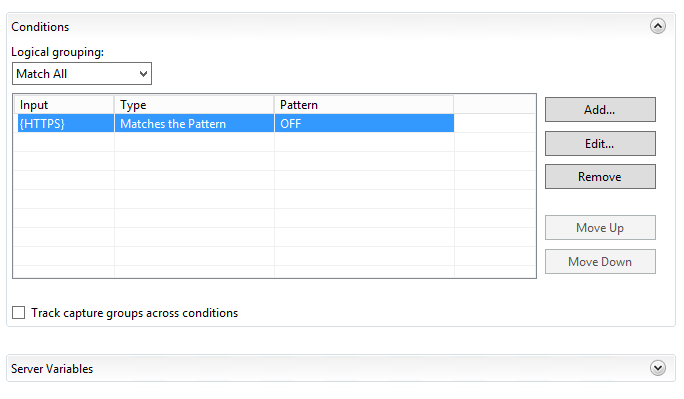
For your conditions, add a condition with the input as {HTTPS} matching the pattern of OFF:

Capture2

For the action select Redirect and set your Redirect URL to https://{HTTP_HOST}/{R:0}. Select to append query string and indicate the Redirect type is a Permanent (301):

Capture3

Once this is completed (and assuming you have configured your sites for SSL) then you can test it by browsing any page or directory on your site with HTTP and watch it change to HTTPS. Easy enough, right? Hope this helps.