Blog, Web

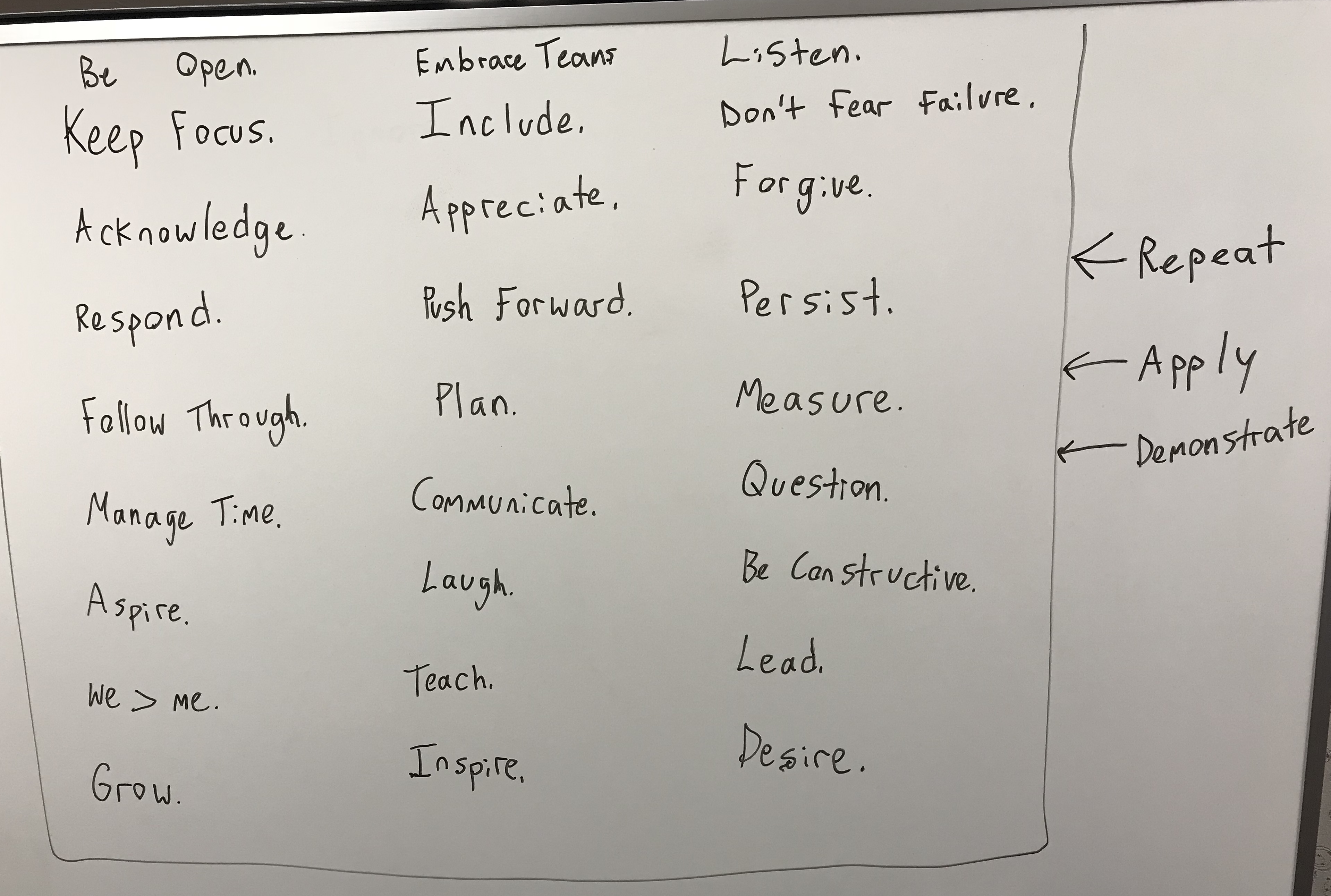
Action board: What words and actions are driving you?

I find each day has its challenges to give a chance to reveal a new possible action that can be taken to improve the moment.

As something I am learning each day I find that sometimes it’s good to visualize key actions and values to remember how we focus ourselves and work to apply them every day. You may not apply them all at once but as you come back to it and think through your experiences you can reflect and continue to figure out where you can grow and build your partnerships.

Challenge yourself, chances are you may find you have a lot more of these than you think. Thanks for reading.

Any other good ones for the board?

Blog, Web

Four Lessons about Facing Adversity as a New Employee

When I first set out to write this I was not sure where it was going to end up. I just knew that the experiences that I have had through the years just could not be brushed off without someone gaining a valuable lesson from someone else’s story. That’s what I hope this does and I believe that if you will apply these things to your own life you will grow as a person and in your career to move forward.

So the backstory: 6 months into a new job. I now have just enough time under my belt not to be the “new guy” and enough wins and deployments to have an opinion that matters amongst the team…well, most of the team. There were a couple holdouts that simply could not believe a new guy out of school could pick up some things so quickly and be acclimated to the norm. As I sat in a traditional project staff meeting I volunteered to participate in an upcoming project of great complexity to do some development that had not been done before at that time. No sooner than I had signed myself up one of my colleagues emphatically challenged me by saying, “Just because you think you can do one or two really easy things doesn’t make you a senior analyst nor qualifies you to work on high priority projects”. I still can remember the hush in the room that day. I quickly reacted and followed that with, “Well, I understand your opinion but would like the chance to participate and to prove my abilities and will hope to show you that I can be a contributor to the project”.

So what did I learn from this experience?

Four Lessons about Facing Adversity as a new Employee:

1) In any new job or responsibility you will be challeneged on your capability. This is expected and should be welcomed as an opportunity for you to show how you can contribute with your strengths and abilities.

2) When you are challenged by others about your abilities you need to respond with your willingness to step up to the challenge. Being challenged does not mean you should run away from adversity. Strive forward to be the first in line to say, “Yes, I want to be a part of change”

3) Mistakes are often made when people get too deep into the weeds when arguing in the details of things to prove their knowledge; remember that everyone in the room has to grow in their understanding and will fail and make mistakes as well. Be patient and remember it is about the working relationship and the details.

4) Showing your resolve will allow others to see a resounding confidence and ability to accept diversity and capability to move forward. The greater you continue to build your confidence the greater you will build relationships and trust with your business and colleagues. 

So the moral of this story? In the end I not only took the additional responsibility on this project but eventually became the lead over it. As a result of its success I received a raise, a promotion and other opportunities with other projects that I would have been passed over on previously (had I backed down from the previous adversity I received). Most notably I am happy to say that out of that experience it help me to grow to respect and work well with the colleague who challenged me.

Remember to continue to believe in your confidence, trust your abilities, build the relationships with others and you will begin to see results start working greater for your good.

More to come, hope this was helpful.


.Net, AWS, IIS, Programming, Security, Troubleshooting, Visual Studio, Web

AWS Elastic Beanstalk ebextensions: Update the IIS App Pool using commands to another App Pool Identity

So I had a .Net application that needed to leverage the Network Service application identity instead of the OOB ApplicationPoolIdentity that comes with a default shipped EBS windows server with IIS. The solution? An ebextenion of course!

0) We’re going to have a step 0 assuming you already have a development AWS account with credits to push servers to Elastic Beanstalk. If you have not do this part then do some reading here: https://aws.amazon.com/elasticbeanstalk/

1) Once you have an account and have configured your Visual Studio environment to your account appropriately then proceed to open your VS solution.

2) Create a folder in your solution called .ebextensions

3) Create your config file (if you don’t have an editor Notepad++ will do) within that folder and edit it in YAML format

The following example below will update the DefaultAppPool app identity to Network Service leveraging powershell and the commands/command features:

files:
  "C:\\Robo\\Update_App_Pool.ps1":
    content: |
      Write-Verbose 'Update the application pool'
      Set-Location C:\\Robo
      import-module WebAdministration
      Set-ItemProperty IIS:\AppPools\DefaultAppPool -name processModel.identityType -value 2
  
commands:
  update_app_pool: 
    command: powershell.exe -ExecutionPolicy Bypass -File "C:\\Robo\\Update_App_Pool.ps1"
    ignoreErrors: False
    waitAfterCompletion: 0	

4) Save the Deploy this with your application into EBS you should see the updated app pool identity as the application is deployed.

Hope this helps. Questions are welcome!

If you want to venture deeper into this then start here: http://docs.aws.amazon.com/elasticbeanstalk/latest/dg/customize-containers.html

Validate here: http://www.yamllint.com/

HTML, Intercom, JavaScript, Web, Wordpress

So You Only Want Intercom Chat On Certain Pages In WordPress? Here’s How!

So I had a client want to use Intercom. Great! So I went to Intercom and signed up for an account, then went to our WordPress instance and downloaded the Intercom for WordPress plugin. Everybody wins! Until…I get the requirement after the fact that the client does not want the chat pop up on every page…but only on certain pages. However, the out of the box Intercom for WordPress plugin is only built to be supported for all pages and not some. What to do…what to do…let’s figure it out.

First, login into your WordPress (.org version) as an admin and uninstall the Intercom for WordPress plugin. Next install the Head, Footer and Post Injections Plugin:

Once installed, go to the Head, Footer and Post Injections plugin settings and insert the following script injection into the Desktop and Mobile (Check the Mobile checkbox) BEFORE THE CLOSING TAG (FOOTER). 

<script>
var ref1= window.location.pathname;
var search1 = "/pagepath1/";
var search2 = "/pagepath2/"; 
if (ref1.indexOf(search1) > -1 || ref1.indexOf(search2) > -1)
  window.intercomSettings = {
    app_id: "YourIntercomID"
  };
</script>
<script>(function(){var w=window;var ic=w.Intercom;if(typeof ic==="function"){ic('reattach_activator');ic('update',intercomSettings);}else{var d=document;var i=function(){i.c(arguments)};i.q=[];i.c=function(args){i.q.push(args)};w.Intercom=i;function l(){var s=d.createElement('script');s.type='text/javascript';s.async=true;s.src='https://widget.intercom.io/widget/nna8fbly';var x=d.getElementsByTagName('script')[0];x.parentNode.insertBefore(s,x);}if(w.attachEvent){w.attachEvent('onload',l);}else{w.addEventListener('load',l,false);}}})()</script>

Save the plugin settings. This JavaScript will check on the specified page paths and only execute turning on Intercom for the specific page paths. Hope this helps!