Skip to content

@JaredMeredith

Learn. Share. Repeat.

Contact

  • Blog
  • About Me
  • Strengths Finder Top 5
    • Strengths Finder All 34
  • 16Peronalities
  • Builder Profile 10
  • Solved: Issue with SharePoint Rest API Document Upload – Solving the case of the single apostrophe/quote in the URL POST

    04/26/2017

    +

    +

    +

    +

    +

    +

    So I ran across an interesting mystery a while back that I thought I would share the fix for once I had time to document it. I have a client that uses an embeddable SharePoint page within CRM to allow document uploads right from the front entity screens without having to deviate to another screen and for the most part things have been going well. Until…the mystery began.

    The problem: In some sporadic cases when uploading documents via POST to the REST API users would encounter an issue with the dynamically generated URLs from SharePoint that contain single apostrophes or quotes in the library name that would be used in the POST URL.

    Errors may look like:

    {"error":{code":"-1,Microsoft.SharePoint.Client.InvalidClientQueryException","message":{"lang":en-US","value":"The expression\"web/getfolderbyserverrelativeurl('yourfolder/O'Lastname, Firstname - 23424ID')/files/add(overwrite=true,url='filename.pdf')\" is not valid."}}}
    

    The odd part about that? If you browse the library on its own, it’s fine! However, trying to post to the REST API with an improperly escape quote is not. So let’s fix that.

    The solution: It’s all in how you build the URL with properly escaped characters.

    Snippet in question:

        // Add the file to the file collection in the Shared Documents folder.
        function addFileToFolder(arrayBuffer) {
    
            // Get the file name from the file input control on the page.
            var parts = fileInput[0].value.split('\\');
            var fileName = parts[parts.length - 1];
    
            // Construct the endpoint.
            var fileCollectionEndpoint = String.format(
                    "{0}/_api/web/getfolderbyserverrelativeurl('{1}')/files" +
                    "/add(overwrite=true, url='{2}')",
                    serverUrl, serverRelativeUrlToFolder, fileName);
    
            // Send the request and return the response.
            // This call returns the SharePoint file.
            return jQuery.ajax({
                url: fileCollectionEndpoint,
                type: "POST",
                data: arrayBuffer,
                processData: false,
                headers: {
                    "accept": "application/json;odata=verbose",
                    "X-RequestDigest": jQuery("#__REQUESTDIGEST").val(),
                    "content-length": arrayBuffer.byteLength
                }
            });


    Fixed snippet:

        // Add the file to the file collection in the Shared Documents folder.
        function addFileToFolder(arrayBuffer) {
    
            // Get the file name from the file input control on the page.
            var parts = fileInput[0].value.split('\\');
            var fileName = parts[parts.length - 1];
    
            // Construct the endpoint.
            var fileCollectionEndpoint = String.format(
                    "{0}/_api/web/getfolderbyserverrelativeurl('{1}')/files" +
                    "/add(overwrite=true, url='{2}')",
                    serverUrl, serverRelativeUrlToFolder.replace(/\%27/g,"''"), fileName);
    
            // Send the request and return the response.
            // This call returns the SharePoint file.
            return jQuery.ajax({
                url: fileCollectionEndpoint,
                type: "POST",
                data: arrayBuffer,
                processData: false,
                headers: {
                    "accept": "application/json;odata=verbose",
                    "X-RequestDigest": jQuery("#__REQUESTDIGEST").val(),
                    "content-length": arrayBuffer.byteLength
                }
            });


    Conclusion? With the replace regex fix in place it will now take every occurance (and not just the first, thanks regex) of a single quote that come as a part of the folder directory and properly escape them when I want to post a file back with the API.

    Key change:

    serverRelativeUrlToFolder.replace(/\%27/g,"''")
    

    Everybody wins now, espcially the people out there with apostrophes in there names and folder names with titles that still need the quotes in them! Hope this helps.

    References:
    • Upload a file by using the REST API and jQuery
    • HTML URL Encoding Reference

    Help me out and share!

    • Email a link to a friend (Opens in new window) Email
    • Print (Opens in new window) Print
    • Share on LinkedIn (Opens in new window) LinkedIn
    • Share on Facebook (Opens in new window) Facebook
    • Share on X (Opens in new window) X
    • Share on Reddit (Opens in new window) Reddit
    • Share on Tumblr (Opens in new window) Tumblr
    • More
    • Share on Pinterest (Opens in new window) Pinterest
    • Share on Telegram (Opens in new window) Telegram
    • Share on WhatsApp (Opens in new window) WhatsApp
    Like Loading…

    +

    +

    +

    +

    +

    +

    + API, CRM, JavaScript, Programming, SharePoint, Troubleshooting, Web
    + CRM, escape characters, JavaScript, Rest API, SharePoint, Troubleshooting, Upload

    +

    +

    +

    +

    +

    +

    +

    +

    +

    +

    +

    +

  • Solved: The length of the URL for this request exceeds the configured maxUrlLength value.

    03/12/2017

    +

    +

    +

    +

    +

    +

    Anyone ever run into the following before? I ran into this regarding a request into the SharePoint Rest API.

    The length of the URL for this request exceeds the configured maxUrlLength value.

    This because the IIS default maximum length for an URL is 260 characters. If a URL request is longer, the above error will occur.

    To fix this you can increase the maxURLlength value, add it to your web.config file in the IIS virtual Directory.

    <configuration>
    
      <system.web>
    
        <httpRuntime maxUrlLength="5000" />
    
      </system.web>
    
    </configuration>
    

    It will be likely you will already have most of this snippet in place so don’t break your config; just add the maxUrlLength property into your existing httpRuntime section and you should be good to go. Do know any web.config changes may cause a service interruption so test in dev, beta, QA and pre-prod before ever changing in prod! Hope this helps, questions are welcome!

    Help me out and share!

    • Email a link to a friend (Opens in new window) Email
    • Print (Opens in new window) Print
    • Share on LinkedIn (Opens in new window) LinkedIn
    • Share on Facebook (Opens in new window) Facebook
    • Share on X (Opens in new window) X
    • Share on Reddit (Opens in new window) Reddit
    • Share on Tumblr (Opens in new window) Tumblr
    • More
    • Share on Pinterest (Opens in new window) Pinterest
    • Share on Telegram (Opens in new window) Telegram
    • Share on WhatsApp (Opens in new window) WhatsApp
    Like Loading…

    +

    +

    +

    +

    +

    +

    + .Net, CRM, IIS, MVC, Programming, Security, SharePoint, Sitecore, Troubleshooting, Visual Studio, Web, Web Service, Windows
    + Error, request, SharePoint, Troubleshooting, URL

    +

    +

    +

    +

    +

    +

    +

    +

    +

    +

    +

    +

  • Solved: Method not found: ‘!!0[] System.Array.Empty()’.

    03/12/2017

    +

    +

    +

    +

    +

    +

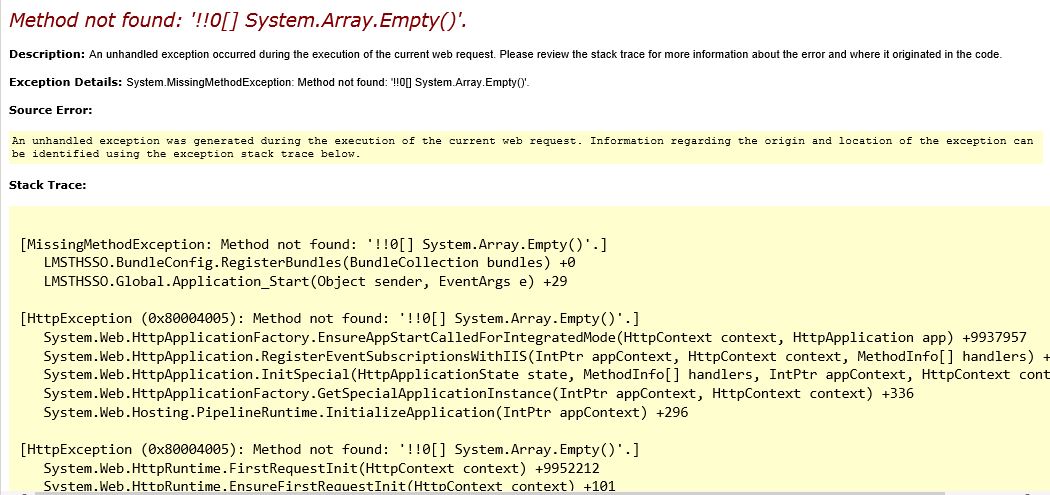
    If you are getting a message for your recently developed .Net application when you publish to the server to the effect of:

    ssnetframeworkerror

    Chances are the server you are deploying to does not have the appropriate framework to support your app.

    Download the Microsoft .Net Framework 4.6.1 and install it to resolve this. It will likely require a server reboot to complete it so don’t do it on prod mid-day! Hope this helps, questions are welcome!

    Help me out and share!

    • Email a link to a friend (Opens in new window) Email
    • Print (Opens in new window) Print
    • Share on LinkedIn (Opens in new window) LinkedIn
    • Share on Facebook (Opens in new window) Facebook
    • Share on X (Opens in new window) X
    • Share on Reddit (Opens in new window) Reddit
    • Share on Tumblr (Opens in new window) Tumblr
    • More
    • Share on Pinterest (Opens in new window) Pinterest
    • Share on Telegram (Opens in new window) Telegram
    • Share on WhatsApp (Opens in new window) WhatsApp
    Like Loading…

    +

    +

    +

    +

    +

    +

    + .Net, IIS, Troubleshooting, Visual Studio, Web, Windows
    + .Net, Error, error message, framework, Troubleshooting

    +

    +

    +

    +

    +

    +

    +

    +

    +

    +

    +

    +

  • Example of a JIRA Priority/Work Estimate/Role Matrix

    02/22/2017

    +

    +

    +

    +

    +

    +

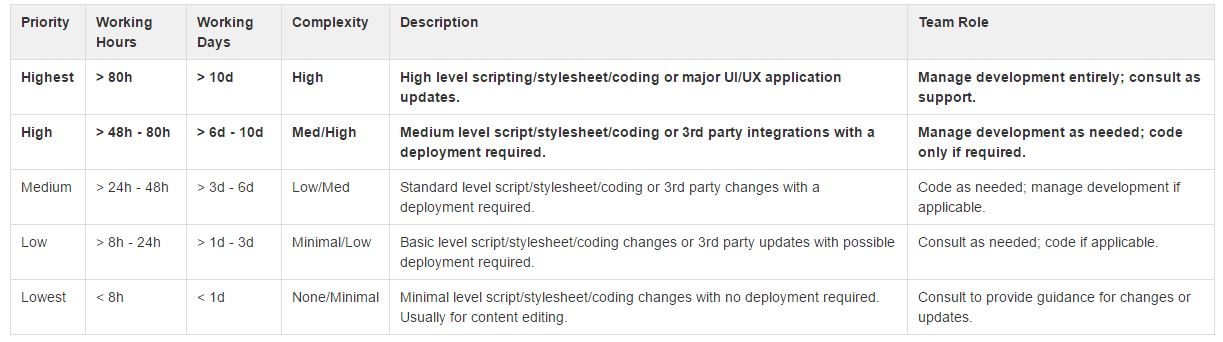
    So as I work to help standardize how the teams I work with estimate effort on their projects I have worked through leveraging JIRA to better help clarify what the priority field could mean. We work in a space where when items go beyond a certain amount of hours that we want to switch from a developer role into a consultant/management role.

    matrix

    If you would like a file with it instead you can get that here. Hope this helps!

    Help me out and share!

    • Email a link to a friend (Opens in new window) Email
    • Print (Opens in new window) Print
    • Share on LinkedIn (Opens in new window) LinkedIn
    • Share on Facebook (Opens in new window) Facebook
    • Share on X (Opens in new window) X
    • Share on Reddit (Opens in new window) Reddit
    • Share on Tumblr (Opens in new window) Tumblr
    • More
    • Share on Pinterest (Opens in new window) Pinterest
    • Share on Telegram (Opens in new window) Telegram
    • Share on WhatsApp (Opens in new window) WhatsApp
    Like Loading…

    +

    +

    +

    +

    +

    +

    + JIRA, Software
    + estimates, JIRA, matrix, priority, role, Software, working days, working hours

    +

    +

    +

    +

    +

    +

    +

    +

    +

    +

    +

    +

  • Ready to send email in Amazon SES? Let’s Go!

    01/13/2017

    +

    +

    +

    +

    +

    +

    First, consult with AWS and get your credentials:

    http://docs.aws.amazon.com/ses/latest/DeveloperGuide/using-credentials.html
    and
    http://docs.aws.amazon.com/ses/latest/DeveloperGuide/send-using-smtp-net.html

    Secondly, let’s make a more easily updatable emailSettings section (encrypt it later, see here if you need help):

      <appSettings>
        <add key="MailFrom" value="donotreply@youremaildomain.com"/>
        <add key="MailTo" value="whoareyousendingto@theiremaildomain.com"/>
        <add key="MailHost" value="	email-smtp.youramazonseshost.com"/>
        <add key="MailPort" value="587"/>
        <add key="MailServerUserName" value="awsSESusername"/>
        <add key="MailServerPassword" value="awsSESpassword"/>
      </appSettings>
    

    Then, include the reference:

    	using System.Net.Mail;		
    

    Finally, write your method:

    	public static void sendEmail(string to, string from, string subject, string body)
    	{
    		try
    		{
    			// Initialize client and message
    			using (SmtpClient mailclient = new SmtpClient(ConfigurationManager.AppSettings["MailHost"].ToString(), Convert.ToInt32(ConfigurationManager.AppSettings["MailPort"])))
    			{
    				// Create message
    				mailclient.UseDefaultCredentials = false;
    				mailclient.EnableSsl = true;
    				mailclient.Credentials = new System.Net.NetworkCredential(ConfigurationManager.AppSettings["MailServerUserName"].ToString(), ConfigurationManager.AppSettings["MailServerPassword"].ToString());
    				MailMessage message = new MailMessage(from, to);
    				message.Subject = subject;
    				message.Body = body;
    				message.IsBodyHtml = true;
    				mailclient.Send(message);
    			}
    		}
    		catch (SmtpException ex)
    		{                
    			// Service was not available to send message keep trying
    			if (ex.StatusCode.Equals(SmtpStatusCode.ServiceNotAvailable))
    			{
    				sendEmail(to, from, subject, body);
    			}
    		}
    	}
    

    Great! Now you can call it and send an email

    string htmlBody = "<b>Hi! It's my message</b>";
    sendEmail(ConfigurationManager.AppSettings["MailTo"].ToString(), ConfigurationManager.AppSettings["MailFrom"].ToString(), "Your Email Subject", htmlBody); 
    

    You can always put whoever and whatever when you call the method using To, From, Subject and Body.

    Enjoy! Questions are welcome.

    Help me out and share!

    • Email a link to a friend (Opens in new window) Email
    • Print (Opens in new window) Print
    • Share on LinkedIn (Opens in new window) LinkedIn
    • Share on Facebook (Opens in new window) Facebook
    • Share on X (Opens in new window) X
    • Share on Reddit (Opens in new window) Reddit
    • Share on Tumblr (Opens in new window) Tumblr
    • More
    • Share on Pinterest (Opens in new window) Pinterest
    • Share on Telegram (Opens in new window) Telegram
    • Share on WhatsApp (Opens in new window) WhatsApp
    Like Loading…

    +

    +

    +

    +

    +

    +

    + .Net, AWS, C#, IIS, Programming, Web, XML
    + AWS, C#, Email, send, SES

    +

    +

    +

    +

    +

    +

    +

    +

    +

    +

    +

    +

Previous
1 … 4 5 6 7 8 … 14
Next

Linkedin

Tumblr

GitHub

Mastodon

Create a website or blog at WordPress.com

Loading Comments...
  • Subscribe Subscribed
    • @JaredMeredith
    • Join 75 other subscribers
    • Already have a WordPress.com account? Log in now.
    • @JaredMeredith
    • Subscribe Subscribed
    • Sign up
    • Log in
    • Report this content
    • View site in Reader
    • Manage subscriptions
    • Collapse this bar
%d